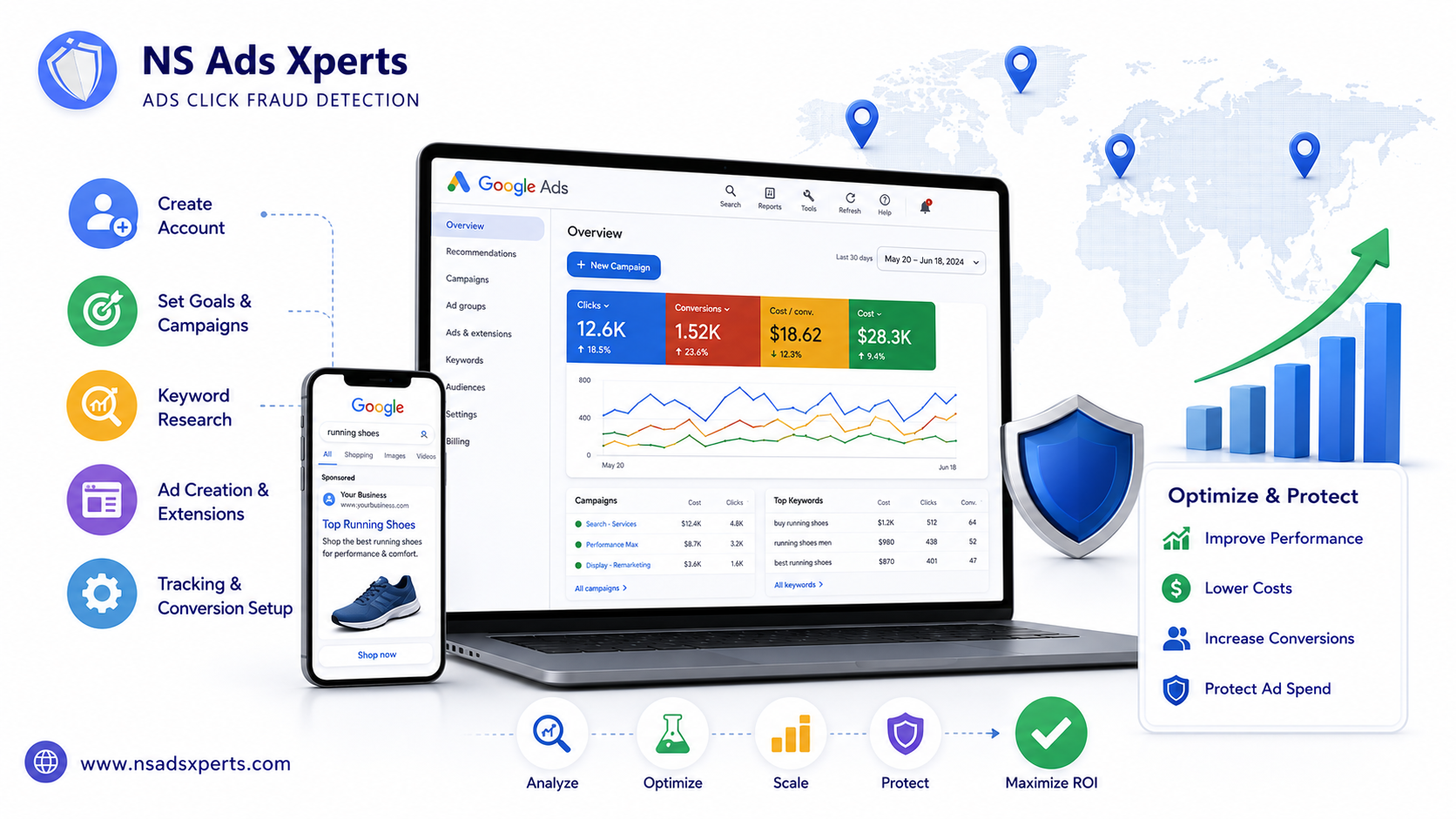
In the dynamic world of digital advertising, a well-managed Google Ads account is not just an asset—it's the cornerstone of your online marketing success. Whether you're a budding entrepreneur, a small business owner, or an experienced digital marketer, understanding the intricacies of Google Ads is crucial for reaching your target audience and driving measurable results. However, navigating this powerful platform can be daunting, often leading to common pitfalls like wasted ad spend, high Cost Per Click (CPC), and frustratingly low conversion rates.
This comprehensive guide is designed to empower you with the knowledge and practical steps needed to effectively create, manage, and optimize your Google Ads account. We'll demystify complex concepts, provide actionable strategies for improving your campaign performance, and crucially, introduce you to vital solutions for protecting your valuable ad budget from threats like click fraud. By the end, you'll be equipped to leverage Google Ads for maximum ROI, positioning your business for sustained growth in the global market.
Understanding Your Google Ads Account: The Foundation of Digital Advertising
At its core, a Google Ads account serves as your central command center for all online advertising activities within Google’s vast ecosystem. It's the platform where you craft campaigns, target specific audiences, and track performance, ultimately aiming to achieve your business objectives, whether that's generating leads, driving sales, or boosting brand awareness globally. A well-managed account is paramount for success, helping businesses avoid the pitfalls of high CPC and low conversion rates that often plague unoptimized campaigns.
What Exactly is a Google Ads Account?
A Google Ads account is a centralized hub provided by Google for advertisers to create, manage, and track their online advertising campaigns. Think of it as your digital storefront on the internet's busiest streets, allowing you to showcase your products or services to billions of potential customers worldwide. Its core functionalities include campaign creation, keyword targeting, ad copy writing, budget management, and comprehensive performance tracking.
Every account is assigned a unique Customer ID (CID), a 10-digit number that identifies your specific Google Ads account. This CID is crucial for linking accounts, receiving support, and ensuring proper billing and reporting. Understanding this foundational element is the first step towards mastering your advertising efforts.
Why Every Business Needs a Google Ads Account for Global Reach
In today's interconnected world, a robust online presence is non-negotiable, and Google Ads provides unparalleled opportunities for global reach. Through your Google Ads account, you gain access to Google's immense search and display network, YouTube, Gmail, and a vast network of partner sites. This allows for highly precise targeting capabilities, enabling you to reach specific geographic locations, demographics, interest groups, and even remarket to past website visitors.
The platform offers measurable results and incredible flexibility, allowing you to continually optimize your campaigns based on real-time data. For businesses grappling with high CPC and low conversion rates, a strategically managed Google Ads account can transform these challenges into opportunities for growth. It provides the precision needed to ensure every advertising dollar is spent effectively, reaching the right people at the right time.
Different Types of Google Ads Accounts: Individual vs. Manager (MCC)
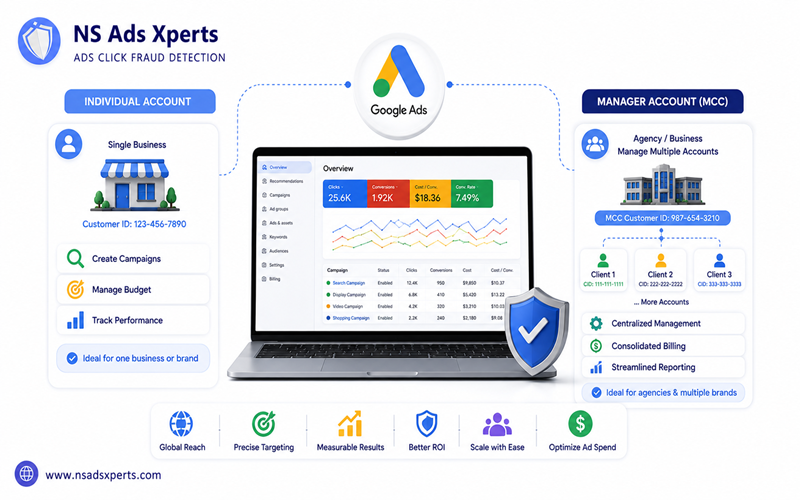
Google Ads offers different account structures to suit varying needs. An individual Google Ads account is typically used by a single business or individual to manage their own advertising campaigns. It's straightforward and ideal for those with one website or brand to promote.
For agencies, consultants, or larger businesses managing multiple brands or client accounts, the Google Ads Manager Account (MCC), also known as My Client Center, is indispensable. An MCC account acts as an umbrella, allowing you to view and manage multiple individual Google Ads accounts from a single dashboard. The benefits of an MCC are significant: centralized management, consolidated billing, and streamlined reporting across all linked client accounts, making it a powerful tool for efficient Google Ads management at scale.
Step-by-Step: Creating Your Google Ads Account Like a Pro
Setting up your Google Ads account correctly from the start is critical. It lays the groundwork for all your future campaigns and helps you avoid common complications down the line. This section provides an actionable, step-by-step guide to creating your account, emphasizing crucial initial settings and how to avoid early pitfalls.
Pre-Account Setup Checklist: What You Need
Before you dive into creating your Google Ads account, gather the following essentials:
- Google Account (Gmail address): You'll need an active Google account to sign up.
- Business Website URL: Your website is where you'll direct ad traffic.
- Payment Method Information: Have your credit card or bank account details ready for billing setup.
- Clear Understanding of Initial Advertising Goals: What do you want to achieve? (e.g., more website traffic, leads, sales, app downloads).
The Account Creation Process: Expert Mode Walkthrough
When you first visit the Google Ads signup page, Google often tries to push you towards "Smart Campaigns," which are simplified but offer less control. To gain full control over your campaigns from day one, you must choose "Expert Mode."
- Go to Google Ads: Visit ads.google.com and click "Start now."
- Sign In: Use your existing Google account or create a new one.
- Bypass Smart Campaigns: When prompted to choose your advertising goal, look for the small link at the bottom that says "Are you a professional marketer? Switch to Expert Mode." Click this link. This is a crucial step to fully leverage your Google Ads account.
- Create a Campaign Without Guidance: In Expert Mode, you'll be asked to create your first campaign. For initial setup, you can opt to "Create a campaign without a goal's guidance" or choose a simple goal. This allows you to complete the account setup and then build your campaigns more strategically later.
- Set Up Initial Campaign Structure (Placeholder): You might be prompted to set up a basic campaign, ad group, and keywords. You can input placeholders here to proceed, knowing you'll refine these significantly later.
Initial Settings: Time Zone, Currency, and Billing Setup
These initial settings are vital for accurate reporting and seamless payments within your Google Ads account.
- Time Zone: This determines when your daily budget resets and how your reports are timestamped. Select the time zone where your business operates or where your primary target audience is located. It cannot be changed later without creating a new account.
- Currency: Choose the currency you want to be billed in. Like the time zone, this setting is permanent for your Google Ads account.
- Billing Setup:
- Navigate to 'Tools and Settings' (wrench icon) > 'Billing' > 'Settings'.
- Enter your business information, including your country and tax details if applicable.
- Add your primary payment method (credit card or bank transfer). Google will typically process automatic payments once your account reaches a certain billing threshold or on a specific date each month.
- You can also add backup payment methods to ensure your ads never stop running due to payment issues.
Understanding billing thresholds and how to access invoices and payment history through your Google Ads account is essential for financial management.
Navigating and Structuring Your Google Ads Account for Success
Once your Google Ads account is set up, familiarizing yourself with its interface and understanding its hierarchical structure is key to effective Google Ads management. A well-organized account is the bedrock of successful campaigns, allowing for precision targeting, efficient budget allocation, and clear performance analysis.
Dashboard Overview: Key Features and Metrics
The Google Ads dashboard is your control panel. Upon logging in, you'll see a main navigation menu on the left, offering access to Campaigns, Ad Groups, Keywords, Ads & Assets, and more. The central area displays key performance metrics (KPIs) such as:
- Impressions: How many times your ad was shown.
- Clicks: How many times users clicked on your ad.
- CTR (Click-Through Rate): The percentage of impressions that resulted in a click.
- Conversions: Desired actions taken by users (e.g., purchases, form submissions).
- Cost: Total amount spent.
You can also access comprehensive reports, insights, and various tools and settings from the dashboard, all crucial for data-driven decisions and continuous Google Ads optimization.
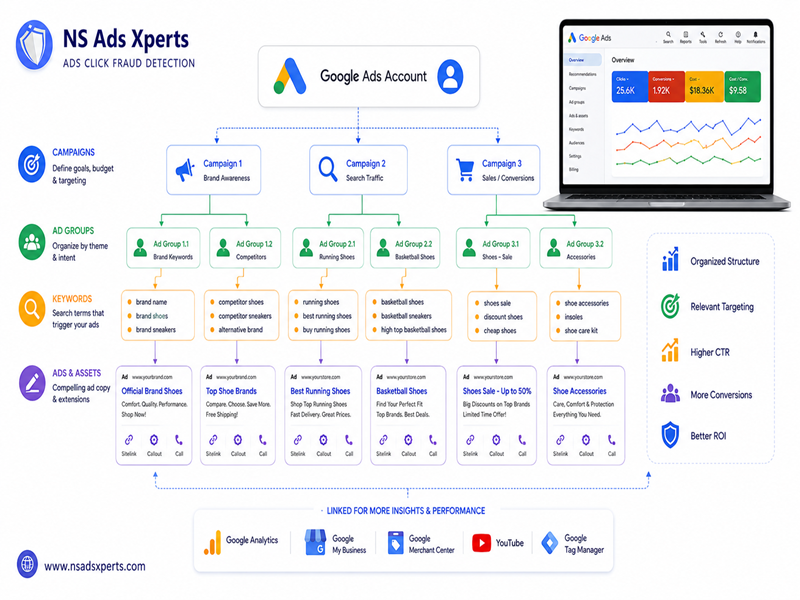
The Hierarchical Structure: Campaigns, Ad Groups, Keywords, and Ads
A fundamental concept in Google Ads management is its hierarchical structure. Understanding this helps you organize your account logically and efficiently:
- Campaigns: At the top level, campaigns define your overall advertising goals, budget, geographic targeting, and network settings (Search Network, Display Network, YouTube, etc.). You might have separate campaigns for different product lines or marketing objectives.
- Ad Groups: Within each campaign, ad groups are used to organize your ads by a common theme. Each ad group should contain a tightly focused set of keywords and highly relevant ads. For instance, a campaign for "shoes" might have ad groups for "men's running shoes," "women's sandals," and "kids' sneakers."
- Keywords: These are the search terms that trigger your ads. Within each ad group, you select keywords relevant to that group's theme. Understanding match types (broad, phrase, exact) is vital for controlling when your ads appear.
- Ads (Ad Copy and Creatives): These are the actual messages users see. Within each ad group, you create multiple ad variations (headlines, descriptions, display URLs) that are highly relevant to your keywords. Effective ad copy is crucial for attracting clicks.
- Assets (Extensions): Previously known as ad extensions, assets provide additional information with your ads, such as phone numbers, site links, structured snippets, and callouts. They enhance ad visibility and provide more reasons for users to click.
Essential Account Settings & Linking Other Google Services
Beyond campaign structure, several account-level settings within your Google Ads account are essential for efficient operation:
- Managing User Access and Permissions: If multiple people manage your account, you can grant different levels of access (e.g., admin, standard, read-only) to team members or your Google Ads consultant. This ensures security and accountability.
- Linking with Google Analytics: This is a powerful integration. Linking your Google Ads account with Google Analytics provides deeper insights into user behavior on your website after they click your ads, helping you understand conversion paths and optimize landing pages.
- Linking with Google My Business: Crucial for local businesses, this link allows you to show location extensions in your ads and run local search campaigns.
- Other Linked Accounts: Depending on your business, you might link to Google Merchant Center (for shopping ads), YouTube (for video campaigns), or other Google services to enhance your advertising capabilities.
Optimizing Your Google Ads Account for Maximum ROI and Security
Creating your Google Ads account is just the beginning. The true power lies in continuous optimization and robust security measures. This section will delve into actionable strategies for Google Ads optimization, address the critical issue of wasted ad spend due to click fraud, and guide you on maintaining account security. At NS Ads Xpert Global, our mission is to optimize your ad spend and increase your ROI by preventing invalid clicks, ensuring your campaigns achieve their full potential.
Core Optimization Strategies for Campaigns and Ad Groups
Effective Google Ads optimization is an ongoing process that involves refining various elements within your campaigns and ad groups:
- Keyword Optimization: Regularly review your search terms report to identify new keywords, add negative keywords to prevent irrelevant impressions, and refine match types. This prevents your ads from showing for searches that won't convert.
- Bid Strategies and Budget Management: Experiment with different automated bid strategies (e.g., Maximize Conversions, Target CPA) and adjust your daily budgets based on performance and ROI.
- Ad Copy Testing (A/B Testing) and Landing Page Optimization: Continuously test different headlines, descriptions, and Call-to-Actions (CTAs) to see what resonates best with your audience. Ensure your landing pages are fast, mobile-friendly, and highly relevant to your ad copy for better Quality Scores and conversion rates.
- Audience Targeting Adjustments and Remarketing Strategies: Refine your audience targeting based on demographics, interests, and behaviors. Implement remarketing campaigns to re-engage users who have previously interacted with your website or app.
- Leveraging Conversion Tracking for Data-Driven Decisions: Accurate conversion tracking is paramount. It allows you to see which keywords, ads, and campaigns are driving valuable actions, enabling you to allocate budget more effectively and improve your overall ROI.
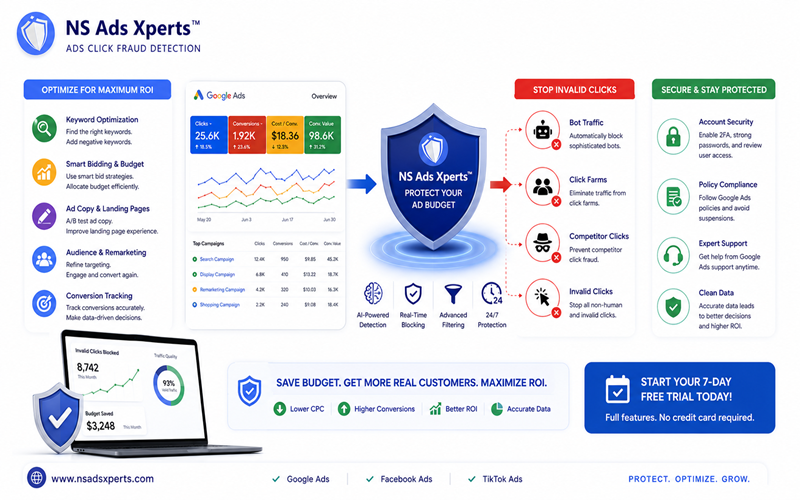
Protecting Your Ad Spend: Combating Click Fraud with NS Ads Xperts™
One of the most insidious threats to any Google Ads account is click fraud. This pervasive problem involves invalid clicks from bots, click farms, or even competitors, leading to a significant waste of your advertising budget, artificially high CPCs, and skewed performance data. Without proper protection, your efforts in Google Ads optimization can be severely undermined by these malicious activities.
This is where NS Ads Xperts™, a leading SaaS solution from NS Ads Xpert Global, becomes your indispensable ally. NS Ads Xperts™ is specifically designed to directly address these pain points for all Google Ads account users. Our advanced click fraud detection and prevention software works tirelessly to:
- Ngăn chặn triệt để các loại click ảo: We proactively block all forms of invalid clicks, including sophisticated bot traffic, malicious click farms, and competitive click fraud, ensuring your ads are seen by real, interested customers.
- Tối ưu hóa chi phí quảng cáo: By eliminating wasted spend on fraudulent clicks across platforms like Google Ads, Facebook Ads, and TikTok Ads, NS Ads Xperts™ helps you retain more of your budget for legitimate engagements.
- Cải thiện tỷ suất hoàn vốn (ROI) và độ chính xác của dữ liệu quảng cáo: With clean data, your optimization efforts become far more effective, leading to higher conversion rates and a significantly improved ROI.
Don't let invalid traffic erode your marketing budget. Experience the power of proactive protection. Start your 7-day free trial of NS Ads Xperts™ today – it includes full features and requires no credit card. Learn more about how to prevent click fraud and secure your ad campaigns.
Account Security, Compliance, and Troubleshooting Common Issues
Beyond campaign performance, maintaining the security and compliance of your Google Ads account is non-negotiable:
- Best Practices for Securing Your Google Ads Account: Always enable two-factor authentication (2FA), use strong, unique passwords, and regularly review user access permissions.
- Understanding Google Ads Policies and Avoiding Suspensions: Familiarize yourself with Google's advertising policies. Violations can lead to ad disapprovals or even account suspension. Staying compliant is crucial for continuous operation.
- Common Account Issues and Where to Find Support: Ad disapprovals, billing errors, or sudden drops in performance can occur. Google Ads offers extensive help resources and direct support channels to assist with troubleshooting.
- The Importance of Invalid Traffic Google Ads Detection: Detecting and managing invalid traffic Google Ads is not only vital for budget protection but also for maintaining account health and compliance with Google's terms of service. Tools like NS Ads Xperts™ are essential for this, acting as a robust ads fraud protection tool.
Elevating Your Google Ads Performance: When to Seek Expert Help
While this guide equips you with substantial knowledge, there are times when specialized expertise can significantly elevate your Google Ads account performance. Recognizing when to seek external help, whether from a Google Ads consultant or a dedicated Google Ads management agency, can be a game-changer for your business. NS Ads Xpert Global not only provides a critical tool in NS Ads Xperts™ but also understands the broader landscape of effective Google Ads marketing, complementing traditional management services for unparalleled success.
The Role of Google Ads Consultants and Agencies
Many businesses reach a point where managing their Google Ads account in-house becomes challenging due to a lack of time, specialized expertise, or the desire for more advanced strategies. This is when engaging a Google Ads consultant or a Google Ads management agency becomes a strategic move. These professionals offer:
- Specialized Knowledge: Deep understanding of advanced bidding strategies, audience segmentation, and industry best practices.
- Access to Advanced Tools: Beyond standard Google Ads features, agencies often utilize proprietary tools for deeper analysis and optimization.
- Focused Optimization: They dedicate their time to continuous testing and refinement, helping overcome pain points like low conversion rates and difficulties in scaling campaigns profitably.
Choosing the Right Google Ads Management Services and Companies
Selecting the right partner for your Google Ads management services is crucial. When evaluating a Google Ads management company or a Google Ads partner, consider factors such as their experience, case studies, transparent reporting, and proven ROI for clients in your industry. It's important to find a company that aligns with your business goals and values clear communication.
Regardless of whether you manage your Google Ads account in-house or outsource it, integrating a robust solution like NS Ads Xperts™ can significantly enhance any Google Ads management services strategy. By providing a layer of protection against click fraud, NS Ads Xperts™ ensures that the efforts of your team or agency are not undermined by wasted ad spend, leading to superior and more accurate results.
NS Ads Xpert Global: Your Partner in Maximizing Ad Efficiency
At NS Ads Xpert Global, we are recognized as a global leader in click fraud detection, offering innovative solutions that empower businesses to maximize their ad efficiency across all digital platforms. Our core mission is to optimize ad spend and increase ROI by preventing invalid clicks, a common and costly problem in Google Ads marketing.
Our flagship product, NS Ads Xperts™, directly addresses the critical pain points faced by businesses today: high CPCs, low conversion rates, competitor click fraud, and the overall waste of ad budget. By leveraging our advanced software, you can:
- Eliminate bot traffic, competitor attacks, and click farm activities.
- Ensure your ad budget is spent on genuine prospects.
- Gain accurate data for better decision-making and campaign scaling.
We cater to a diverse range of clients, from e-commerce businesses and SaaS companies to marketing agencies and affiliate marketers, offering tailored solutions to fit every need. Our pricing tiers – Starter ($39/month) for single domains, the popular Business ($69/month) for multiple domains and detailed analytics, and the comprehensive Agency ($159/month) for extensive management – provide flexible options for all sizes. Every plan includes a 7-day free trial with full features and no credit card required, allowing you to experience the benefits firsthand.
Don't let invalid clicks compromise your Google Ads account performance. Take control of your ad spend and unlock your true ROI potential. Visit https://www.nsadsxperts.com/ today to learn more and start your free trial. For detailed pricing information, explore our plans at https://www.nsadsxperts.com/pricing.
Frequently Asked Questions About Your Google Ads Account
- Q: What exactly is a Google Ads account and how does it work?
- A: A Google Ads account is your central hub for creating, managing, and tracking online ad campaigns across Google's network. It works by allowing you to bid on keywords, create ads, set budgets, and target specific audiences to drive traffic and conversions to your business.
- Q: How do I create a new Google Ads account step-by-step?
- A: To create a new Google Ads account, you need a Google (Gmail) account. Visit the Google Ads website, choose 'Expert Mode,' and follow the prompts to set up your initial campaign, billing information, time zone, and currency. Ensure you have your website URL and payment details ready.
- Q: What's the difference between an individual Google Ads account and a Manager Account (MCC)?
- A: An individual Google Ads account is for managing a single business's campaigns. A Manager Account (MCC) is designed for agencies or businesses managing multiple Google Ads accounts, offering centralized management, consolidated billing, and easier reporting across all linked client accounts.
- Q: How do I set up billing and payment methods in my Google Ads account?
- A: After creating your account, navigate to 'Tools and Settings' > 'Billing' > 'Settings'. Here, you can add primary and backup payment methods (e.g., credit card, bank transfer), set up your billing threshold, and review your payment history and invoices.
- Q: How can I improve the security of my Google Ads account?
- A: Improve security by enabling two-factor authentication (2FA), using strong, unique passwords, regularly reviewing user access permissions, and staying informed about Google Ads policy updates to avoid suspensions. Tools like NS Ads Xperts™ also enhance security by blocking malicious invalid clicks.
Conclusion
Mastering your Google Ads account is an ongoing journey, but it's one that promises significant returns for your business. From the initial setup to continuous Google Ads optimization and robust security measures, every step plays a crucial role in your online advertising success. By understanding the platform's structure, implementing smart strategies, and proactively protecting your ad spend, you can transform your campaigns into powerful growth engines.
Remember, the digital landscape is fraught with challenges like click fraud, which can silently drain your budget and distort your data. That's why integrating a specialized solution like NS Ads Xperts™ from NS Ads Xpert Global is not just an option, but a necessity for any serious advertiser. We empower you to prevent invalid clicks, optimize your advertising costs, and achieve a higher, more accurate ROI.
Don't leave your ad budget vulnerable. Take control of your Google Ads account today. Visit https://www.nsadsxperts.com/ to start your 7-day free trial of NS Ads Xperts™ and experience the peace of mind that comes with truly effective ad spend protection. Unlock your full advertising potential with NS Ads Xpert Global.