In the vast, competitive landscape of digital marketing, standing out requires strategic prowess and the right tools. For businesses aiming to capture immediate visibility and drive targeted traffic, mastering Google Ads (formerly AdWords) is non-negotiable. This powerful platform allows you to connect with potential customers precisely when they are searching for products or services like yours.
However, navigating the complexities of google adwords advertising can be daunting, especially for beginners. From crafting compelling ad copy to optimizing bids and dealing with budget drains like click fraud, there's a lot to learn. This comprehensive guide will demystify Google Ads, providing a step-by-step roadmap for small and medium business owners, marketing managers, and digital marketing beginners to set up, optimize, and measure effective Pay-Per-Click (PPC) campaigns.
We’ll cover everything from foundational concepts to advanced strategies, ensuring you can maximize your return on investment (ROI) and achieve sustainable business growth. Get ready to transform your understanding of ad words google and unlock its full potential.
Understanding Google Ads (Formerly AdWords): The Foundation of PPC Advertising
Google Ads stands as Google's premier advertising platform, empowering businesses to display their advertisements across Google's extensive network. This includes search results pages, websites, mobile apps, and YouTube. Initially launched as 'Google AdWords' in 2000, the platform underwent a significant rebranding to 'Google Ads' in 2018. This change reflected its evolution beyond just keyword-based search ads to encompass a broader spectrum of ad types and campaign goals, including display, video, and app campaigns.
At its core, Google Ads operates on a Pay-Per-Click (PPC) advertising model. Unlike traditional advertising where you pay for impressions regardless of engagement, PPC means you only pay when someone actually clicks on your ad. This makes it a highly cost-effective and performance-driven marketing channel.
So, how does Google Ads work? It's largely driven by an ad auction system. When a user performs a search, Google runs an instantaneous auction to determine which ads appear and in what order. Your ad's position (Ad Rank) is influenced by your bid (the maximum you're willing to pay per click) and your Quality Score. Quality Score is a diagnostic tool that measures the relevance and quality of your keywords, ads, and landing pages. A higher Quality Score can lead to lower costs and better ad positions.
The benefits of Google Ads for businesses are immense. It offers targeted traffic, allowing you to reach potential customers based on specific keywords, demographics, interests, and locations. Results are highly measurable, providing detailed data on impressions, clicks, conversions, and ROI. You gain quick visibility, often appearing at the top of search results almost immediately, and the platform offers incredible scalability, enabling you to adjust budgets and reach as your business grows.
The Google Ads Ecosystem: Where Your Ads Appear
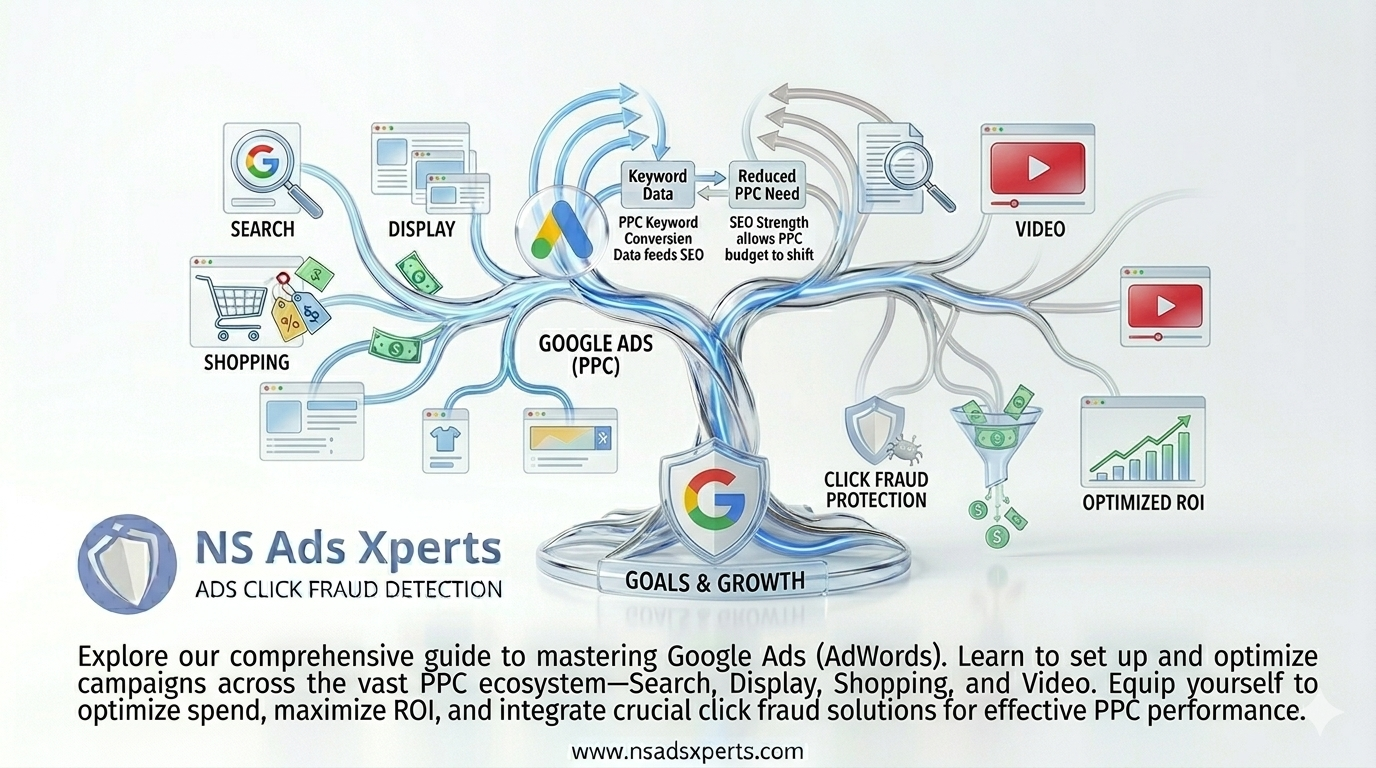
Your ads aren't confined to just Google's search results. The Google Ads ecosystem is vast:
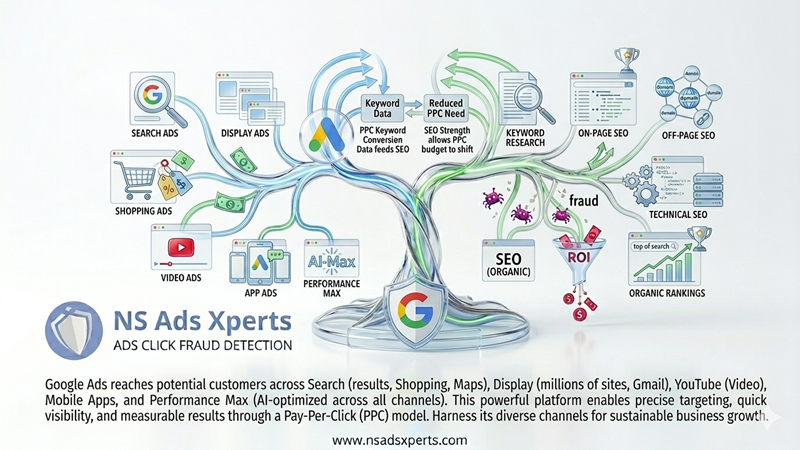
- Google Search Network: This is where your text ads appear alongside search results, Google Shopping results, and on Google Maps. It's ideal for capturing demand from users actively searching for something specific.
- Google Display Network (GDN): Comprising millions of websites, news sites, blogs, and Google properties like YouTube and Gmail, the GDN allows you to reach users while they are browsing content. This is excellent for building brand awareness and remarketing.
- Other Campaign Types: Beyond search and display, Google Ads offers specialized campaigns such as Video campaigns (on YouTube), App campaigns (for app downloads), and Performance Max campaigns, which leverage AI to find converting customers across all Google channels.
Launching Your First Google Ads Campaign: A Step-by-Step Guide
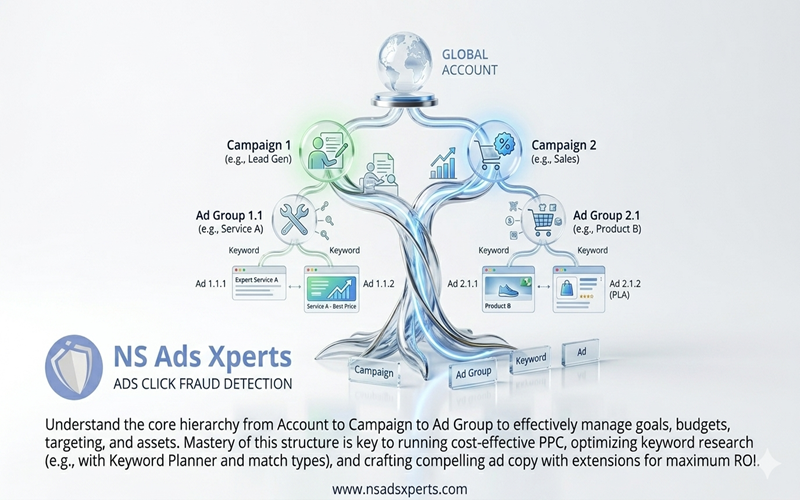
Setting up your first campagne google adwords doesn't have to be complicated. Understanding the core structure is key. A Google Ads account is organized hierarchically: you have an account, which contains multiple campaigns. Each campaign has several ad groups, and within each ad group, you'll find your keywords and your actual ads.
To begin, log into your Google Ads account and choose your primary campaign goal. Are you looking to generate leads, drive sales, increase website traffic, or boost brand awareness? Your goal will inform subsequent settings. Next, set your daily or monthly budget, determining how much you're willing to spend. Define your geographic targeting to reach customers in specific locations, and consider demographic and audience targeting for greater precision.
The importance of clear, measurable goals cannot be overstated. Without them, it's impossible to gauge the success of your efforts. For instance, if your goal is "more leads," define what a lead means (e.g., a form submission, a phone call) and track it diligently.
Choosing the right google adwords keywords is paramount. These are the terms users type into Google that trigger your ads. Provide actionable advice by thinking like your customer: What would they search for? Use a mix of broad, specific, and long-tail keywords. To control ad spend and relevance, master keyword match types:
- Broad Match: Reaches the widest audience, including misspellings, synonyms, and related searches. Use with caution.
- Phrase Match: Your ad shows for searches that include the exact phrase, plus words before or after it.
- Exact Match: Your ad shows only for searches that are the exact term or very close variations.
- Negative Keywords: Crucial for preventing your ads from showing for irrelevant searches, saving you money and improving ad relevance.
Mastering Keyword Research with Google Ads Keyword Planner
To build a robust keyword list, the Google Ads Keyword Planner is your indispensable, free ally. This tool allows you to discover new keywords, get historical data on search volume, and forecast performance for potential keywords, including estimated bids. To use it effectively, input seed keywords related to your business, and the planner will generate a list of related terms, along with their average monthly searches and competition levels.
Steps to use the Keyword Planner:
- Access it through the 'Tools and Settings' menu in your Google Ads account.
- Choose 'Discover new keywords' or 'Get search volume and forecasts'.
- Enter keywords, phrases, or a website related to your business.
- Analyze the results, looking for keywords with a good balance of search volume and manageable competition.
- Add relevant keywords to your plan and organize them into tightly themed ad groups.
Crafting Compelling Ad Copy and Utilizing Ad Extensions
Once you have your keywords, the next step in your google ads setup is to write engaging ad copy. Your ads are often the first impression a potential customer has of your business. Here are best practices for writing effective headlines and descriptions:
- Be Relevant: Ensure your ad copy directly relates to the keywords in your ad group and the content on your landing page.
- Highlight Unique Selling Propositions (USPs): What makes you better than the competition? (e.g., "Free Shipping," "24/7 Support," "Award-Winning Service").
- Include a Clear Call to Action (CTA): Tell users what you want them to do next (e.g., "Shop Now," "Get a Quote," "Learn More").
- Use Keywords Naturally: Incorporate your target keywords into your ad copy, but avoid keyword stuffing.
Ad extensions are vital for enhancing ad visibility and providing additional valuable information without increasing your cost per click. They allow your ads to take up more space on the search results page, making them more prominent. Common ad extensions include:
- Sitelink Extensions: Link to specific pages on your website (e.g., "About Us," "Services," "Contact").
- Callout Extensions: Highlight key benefits or features (e.g., "Free Consultations," "Expert Staff").
- Structured Snippet Extensions: Showcase specific aspects of your products or services (e.g., "Destinations: Paris, Rome, Tokyo").
- Call Extensions: Display your phone number, allowing users to call you directly from the ad.
Mastering Google Ads Performance: Optimization & ROI Strategies
Launching a campaign is just the beginning. True success in google adwords marketing comes from continuous monitoring and optimization. Google Ads provides robust reports and analytics to help you track performance. You need to understand key metrics:
- Impressions: How many times your ad was shown.
- Clicks: How many times your ad was clicked.
- CTR (Click-Through Rate): Clicks divided by impressions, indicating ad relevance.
- CPC (Cost-Per-Click): The average cost you pay for each click.
- Conversions: Desired actions taken after a click (e.g., purchase, lead form).
- Conversion Rate: Conversions divided by clicks.
- CPA (Cost-Per-Acquisition): Total cost divided by total conversions.
- ROAS (Return On Ad Spend): Revenue from ads divided by ad spend.
Effective budget management and choosing the right bidding strategy are crucial for your google adwords ppc campaigns. You can opt for manual bidding, giving you full control, or leverage automated and smart bidding strategies (like Target CPA, Maximize Conversions) that use Google's AI to optimize for your goals. These automated strategies are increasingly sophisticated and can significantly improve your google ads roi.
The Quality Score is a fundamental concept in Google Ads. It’s a rating from 1-10 that Google assigns to your keywords based on their relevance to your ads and landing pages, and your expected CTR. A higher Quality Score means you pay less for clicks and your ads appear in better positions. To improve your Quality Score, focus on:
- Ad Relevance: Ensure your ad copy closely matches your keywords and user intent.
- Landing Page Experience: Your landing page must be relevant, user-friendly, fast-loading, and provide a clear path to conversion.
- Expected CTR: Write compelling ads that users are likely to click.
Finally, the critical role of landing pages cannot be overstated. Even the best ad copy and keywords will fail if your landing page doesn't convert clicks into desired actions. Optimize your landing pages for speed, relevance to the ad, and a clear, prominent Call to Action. A seamless user experience from ad to landing page is vital for maximizing conversions.
Protecting Your Ad Spend: Combating Click Fraud for Higher ROI
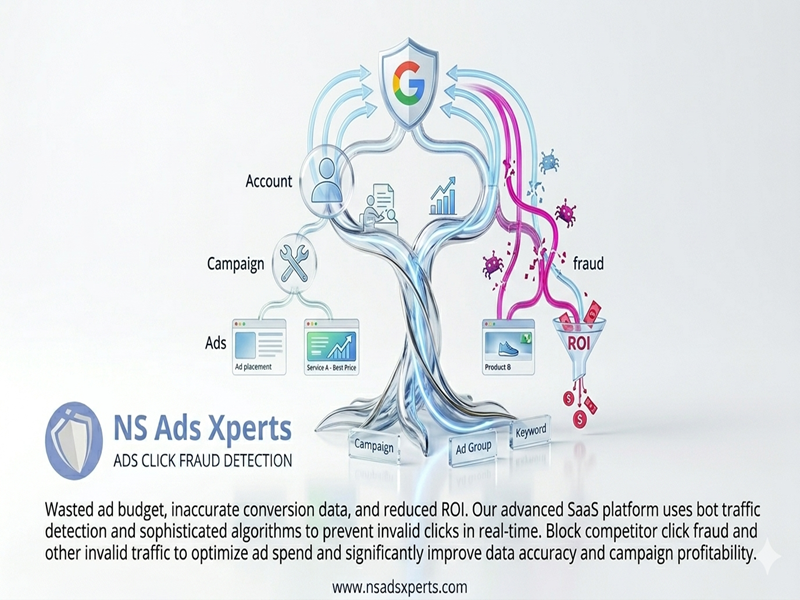
Even with meticulous optimization, a significant threat can silently drain your budget and skew your data: click fraud. This malicious activity involves invalid clicks on your ads, often generated by bots, click farms, or even malicious competitors. The impact is severe: wasted ad budget, inaccurate conversion data, and a drastically reduced ROI. Businesses struggle with high CPC and low conversion rates, often unaware that a portion of their ad spend is being siphoned off by fraudulent clicks.
Common sources of click fraud include automated bots designed to exhaust ad budgets, human click farms hired to generate fake engagement, and aggressive competitor click fraud aiming to sabotage your campaigns and increase your costs. This makes it incredibly difficult to scale advertising profitably.
This is where NS Ads Xperts™ steps in as a vital solution for businesses running Google Ads. NS Ads Xperts™ is a cutting-edge SaaS product designed to prevent invalid clicks and protect your valuable ad budget. It employs advanced bot traffic detection and sophisticated algorithms to identify and block fraudulent activity in real-time. By actively preventing competitor click fraud and other forms of invalid traffic, NS Ads Xperts™ helps you to optimize ad spend and significantly improve the accuracy of your advertising data.
For e-commerce businesses, SaaS companies, marketing agencies, and affiliate marketers who often face the pain points of high CPC and low conversions due to fraudulent clicks, NS Ads Xperts™ offers a crucial defense. It ensures that every dollar you spend goes towards legitimate, potential customers, thereby boosting your overall ROI. Don't let click fraud drain your budget. Try NS Ads Xperts™ for free for 7 days (no credit card required) and see how we prevent invalid clicks and boost your ROI. Visit https://www.nsadsxperts.com/
Expanding Your Reach: Beyond Search & Advanced Google Ads Tactics
While search campaigns are often the starting point, Google Ads offers a much broader spectrum of campaign types to achieve diverse marketing objectives. Understanding these can help you expand your reach and build a more comprehensive digital strategy:
- Display Campaigns: Ideal for brand awareness and remarketing, showing visual ads across millions of websites.
- Shopping Campaigns: Essential for e-commerce, displaying product listings directly in search results.
- Video Campaigns: Leverage YouTube's massive audience for brand storytelling and product promotion.
- App Campaigns: Drive app installs and engagement across Google's properties.
- Performance Max: An automated, goal-based campaign type that uses AI to find converting customers across all Google channels (Search, Display, Discover, Gmail, Maps, YouTube).
Each campaign type serves a different purpose. For instance, Display campaigns are excellent for early-stage customer journeys (awareness), while Shopping campaigns target users with high purchase intent. Remarketing strategies are also incredibly powerful, allowing you to re-engage users who have previously visited your website or interacted with your app, often converting them at a higher rate.
For advanced users and agencies managing multiple accounts or large campaigns, the Google Ads Editor is a desktop application that enables bulk management and offline editing of campaigns. This tool significantly speeds up workflow for complex changes.
Google Ads vs. Organic SEO: Building an Integrated Digital Marketing Strategy
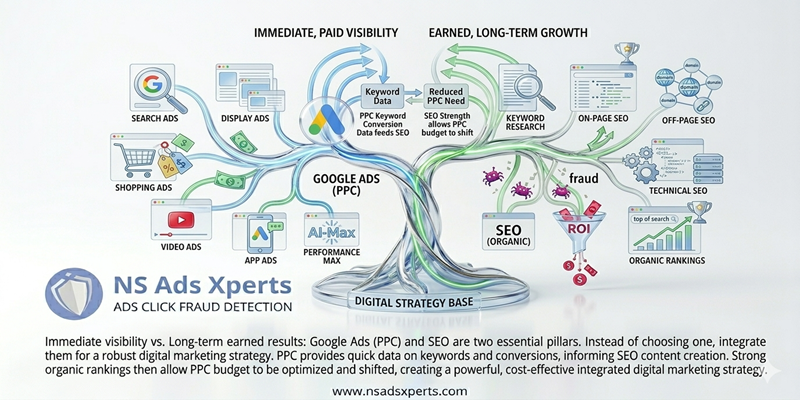
Many businesses wonder about the difference between Google Ads and SEO. While both aim for visibility on Google, their mechanics differ fundamentally. Google Ads (PPC) offers immediate, paid visibility, allowing you to appear at the top of search results almost instantly. In contrast, Google Adwords SEO focuses on earning organic, unpaid visibility over time by optimizing your website content and technical aspects to rank naturally.
Rather than choosing one over the other, a holistic approach is best. Google Ads can complement SEO efforts by providing quick data on keyword performance and conversion rates, which can then inform your SEO strategy. For example, high-converting keywords identified through PPC can be targeted for organic content creation. Conversely, strong organic rankings can reduce the need for paid ads on certain keywords, freeing up budget for other initiatives. Together, they form a powerful, integrated digital marketing strategy google ads.
Navigating Common Google Ads Challenges & Best Practices
While Google Ads offers incredible opportunities, beginners often encounter common pitfalls. These include setting too broad keywords, leading to irrelevant clicks; a poor landing page experience, resulting in high bounce rates; neglecting conversion tracking, making optimization impossible; and failing to use negative keywords, which wastes budget on unwanted searches. Addressing these early on is crucial for effective campaign management.
The key to long-term success in Google Ads is continuous testing and optimization. Regularly A/B test your ad copy, headlines, descriptions, and landing page elements to see what resonates best with your audience. Monitor performance metrics daily or weekly and make data-driven adjustments. The platform is dynamic, and what works today might need refinement tomorrow.
The role of automation and AI in modern Google Ads management is growing. Smart bidding strategies and Performance Max campaigns leverage machine learning to optimize for conversions, saving time and often outperforming manual efforts. However, human oversight and strategic direction remain essential.
For businesses facing complex challenges or lacking the in-house expertise, considering professional help from google adwords services or hiring a dedicated google adwords expert can be a wise investment. These professionals bring experience and advanced strategies to the table, helping you maximize your ad spend and achieve better results.
A significant challenge that even experienced marketers and agencies face is click fraud. This insidious problem can undermine all optimization efforts, leading to inflated costs and misleading data. NS Ads Xpert Global offers a specialized solution to this pervasive issue. By preventing invalid clicks and bot traffic, NS Ads Xperts™ ensures that your ad budget is protected, allowing your legitimate campaigns to thrive. We address pain points like high CPC and low conversion rates, helping businesses globally achieve a higher ROI on their ad spend. Learn more about how we can safeguard your investment at https://www.nsadsxperts.com/
Frequently Asked Questions About Google Ads (AdWords)
- Q: What exactly is Google Ads (AdWords) and how does it function?
- A: Google Ads is Google's advertising platform where businesses bid to display ads on search results and other properties. It operates on a Pay-Per-Click (PPC) model, where advertisers pay when their ad is clicked, with ad placement determined by bid and Quality Score.
- Q: How do I create and launch my first Google Ads campaign?
- A: Start by defining your goals, setting a budget, and choosing your target audience. Then, select campaign type, conduct keyword research (using Google Ads Keyword Planner), write compelling ad copy, and design an effective landing page. Follow the steps within the Google Ads interface.
- Q: How much does Google Ads cost, and how can I manage my budget effectively?
- A: Google Ads cost varies based on industry, keywords, and competition. You set a daily budget, and Google won't exceed it. Effective budget management involves optimizing keywords, improving Quality Score, using negative keywords, and preventing click fraud to ensure every dollar is spent on legitimate clicks.
- Q: What is Quality Score and how can I improve it to lower my CPC?
- A: Quality Score measures ad relevance and landing page experience. Improve it by creating highly relevant ad copy to your keywords, ensuring a positive landing page experience, and aiming for a high expected click-through rate (CTR). A higher Quality Score can lead to lower CPCs and better ad positions.
- Q: What's the key difference between Google Ads and SEO, and should I use both?
- A: Google Ads (PPC) provides immediate, paid visibility, while SEO (Search Engine Optimization) focuses on earning organic, unpaid visibility over time. Both are crucial for a comprehensive digital marketing strategy; Google Ads offers quick results and data, while SEO builds long-term authority and trust.
Mastering Google Ads (formerly AdWords) is a journey, not a destination. It requires continuous learning, testing, and adaptation. By understanding its foundational principles, diligently setting up and optimizing your campaigns, and embracing advanced strategies, you can unlock unparalleled growth for your business.
Remember that the digital advertising landscape is constantly evolving, and staying ahead means not only optimizing your bids and ad copy but also safeguarding your investments. Protecting your ad budget from click fraud is a critical step towards achieving a truly maximized ROI and ensuring every dollar spent works towards your business goals.
Empower your advertising efforts by implementing the strategies outlined in this guide. And for an added layer of protection and to ensure your budget isn't wasted on invalid clicks, explore NS Ads Xperts™. Take control of your ad spend and boost your ROI today. Start your free 7-day trial of NS Ads Xperts™ now – no credit card required! Visit https://www.nsadsxperts.com/ to learn more and elevate your Google Ads performance.