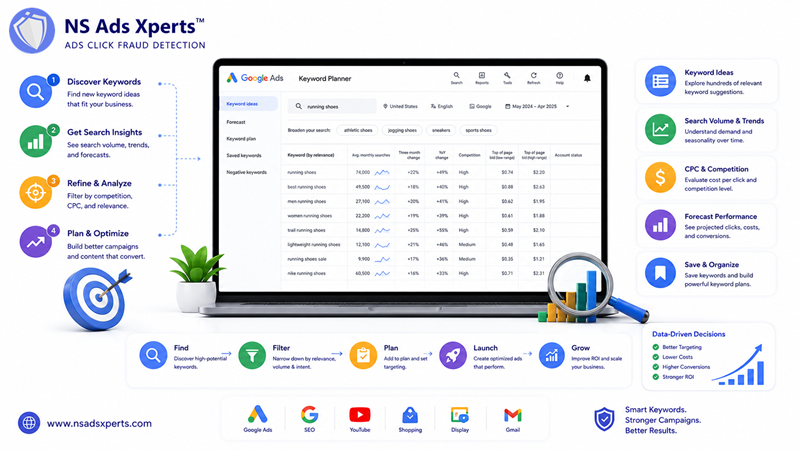
In the dynamic world of digital marketing, the foundation of any successful online campaign, whether for paid advertising or organic search, lies in meticulous keyword research. For those venturing into paid search, the Google Ads Keyword Planner stands as an indispensable, free tool provided by Google. It's not just a utility; it's a strategic compass guiding digital marketers, small business owners, and PPC specialists toward relevant search terms, helping to optimize ad spend and enhance campaign ROI.
This comprehensive guide will take you through an exceptionally detailed, step-by-step journey of the Google Ads Keyword Planner. We'll explore its functionalities, from discovering new keywords for your next Google Ads campaign to analyzing search volume and forecasting potential performance. By the end, you'll be equipped with the knowledge to master keyword research for both PPC and SEO, ensuring your advertising efforts are targeted, efficient, and ultimately more profitable. Get ready to unlock the full potential of your Google Ads for business initiatives.
Understanding Google Ads Keyword Planner: Your Essential Tool
The Google Ads Keyword Planner is a powerful, free resource within the Google Ads platform designed to help advertisers and marketers research keywords for their search campaigns. Its primary functions include discovering new keyword ideas, analyzing their search volume, estimating potential bids, and planning campaign budgets. For anyone serious about online visibility, this tool is the bedrock of strategic planning.
This tool is indispensable for both PPC (Pay-Per-Click) campaigns on Google Ads and for robust SEO (Search Engine Optimization) keyword research. It provides insights into what your target audience is searching for, helping you craft highly relevant ads and content. Historically, it evolved from the well-known 'AdWords Keyword Tool' under the 'AdWords Google Ads' umbrella, adapting to the changing landscape of digital advertising and search behavior.
It's crucial to clarify the distinction between 'Google Ads' and 'Google AdSense'. While both are Google products related to advertising, they serve different purposes. Google Ads (formerly Google AdWords) is the platform for advertisers to create and run ads across Google's network. In contrast, Google AdSense (often seen as google adsense com) is a platform for publishers (website owners) to monetize their content by displaying Google Ads on their sites. The Keyword Planner exclusively supports Google Ads campaign planning.
The core benefits of leveraging this tool are multifaceted: it helps you uncover new, relevant keywords your competitors might be missing, allows you to analyze the average monthly searches for these terms, provides estimates for top-of-page bids to help budget planning, and ultimately aids in creating more effective campaigns that drive better results.
Accessing & Navigating the Keyword Planner: A Step-by-Step Guide
Accessing the Google Ads Keyword Planner is straightforward, provided you have a Google Ads account. Even if you don't have an active campaign, you can still utilize this powerful tool for your research.
Here’s how to access it:
- Log in to Your Google Ads Account: Go to ads.google.com. If you don't have an account, you'll need to create one. You don't need to set up a billing method or launch a campaign to use the Keyword Planner.
- Navigate to 'Tools and Settings': Once logged into your my Google Ads account, look for the 'Tools and Settings' icon (a wrench symbol) in the top right corner of the interface. Click on it.
- Select 'Keyword Planner': Under the 'Planning' column, you'll find 'Keyword Planner'. Click on it to open the tool.
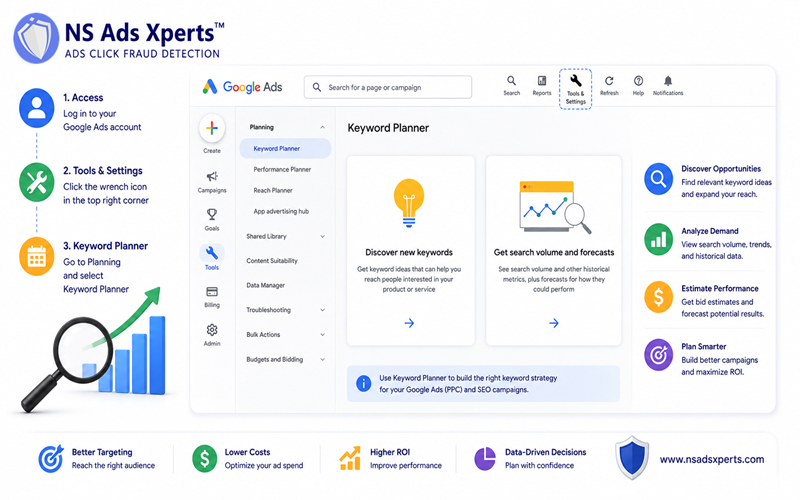
Upon entering the Google Ads Keyword Planner, you’ll see two main functionalities:
- Discover new keywords: This is where you generate fresh keyword ideas relevant to your products, services, or industry.
- Get search volume and forecasts: This feature allows you to upload or paste a list of keywords to see their historical metrics (like average monthly searches) and get performance forecasts for a specific budget.
The dashboard layout typically displays a search bar for input, various filtering options (location, language, date range), and a table presenting keyword ideas along with crucial metrics. Understanding these metrics and filters is key to effective keyword research. You can also monitor your existing keyword plans and campaigns from this central hub, making it a powerful component of your overall google ads com strategy.
Mastering Keyword Discovery & Analysis for Your Business
The true power of the Google Ads Keyword Planner lies in its ability to unearth valuable insights for your digital marketing strategy. Let's dive into its core functionalities.
Discovering New Keywords
This is your starting point for expanding your reach. You have several options to generate keyword ideas:
- Start with keywords: Enter a few seed keywords that describe your product or service. For example, if you sell handmade jewelry, you might start with "handmade necklaces," "custom earrings," or "unique bracelets."
- Start with a website: Input your own website URL or even a competitor's URL. The tool will scan the site for relevant keywords. This is incredibly useful for understanding the semantic context of your business and identifying related terms.
- Start with a product or service category: Choose from a predefined list of categories to narrow down your search.
Once you generate ideas, you can refine them using various filtering options. You can specify a target location (e.g., a specific country, region, or city), language, or even add negative keywords to exclude irrelevant terms from your results. Analyzing keyword ideas based on their relevance to your business and their potential search volume is crucial for building a strong keyword list for your Google Ads for business campaigns.
Getting Search Volume & Forecast Data
After discovering potential keywords, the next step is to understand their performance potential. You can either upload a list of keywords or select them from your 'Discover new keywords' results to get detailed metrics.
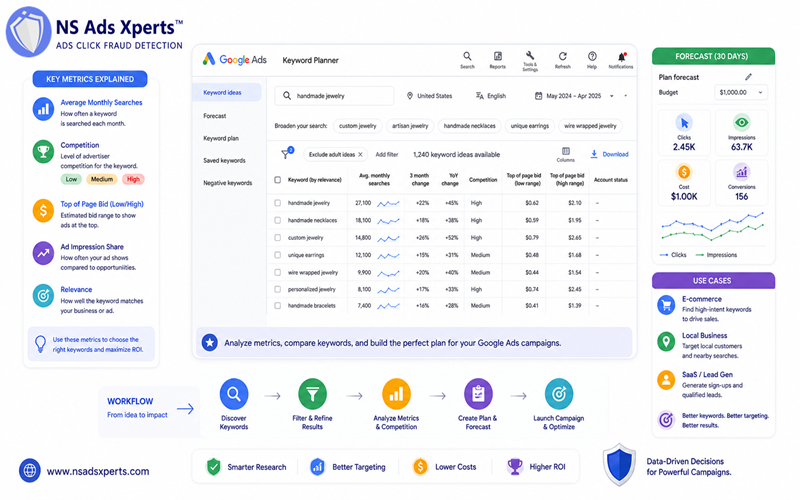
Key metrics to interpret include:
- Average monthly searches: This indicates how many times a keyword is searched on average each month over the past year. It's a vital indicator of demand.
- Competition: Graded as 'Low,' 'Medium,' or 'High,' this metric reflects the number of advertisers bidding on that keyword. High competition often means higher CPC (Cost Per Click).
- Top of page bid (low range, high range): These values estimate the bid you might need to pay to get your ad to appear at the top of the search results. This is crucial for budget planning.
The 'Forecast' feature is particularly powerful. By adding keywords to your plan and specifying a budget, the Keyword Planner can estimate clicks, impressions, cost, and even conversions (if you have conversion tracking set up) over a 30-day period. This helps you visualize the potential impact of your chosen keywords and budget for various Google Ads for business scenarios, such as launching a new e-commerce product line, promoting local services, or driving sign-ups for a SaaS platform.
Using Keyword Planner for SEO Keyword Research
Beyond PPC, the Google Ads Keyword Planner is an invaluable resource for SEO professionals. It helps identify content gaps in your website, allowing you to plan blog topics, new service pages, or product descriptions that align with user search intent. By focusing on keywords with decent search volume and manageable competition, you can improve your organic rankings.
SEO specialists can leverage the tool to find long-tail keywords (longer, more specific phrases) that often indicate clearer user intent and can be easier to rank for. Understanding the intent behind a search query, rather than just the keyword itself, is paramount for creating content that truly resonates with your audience and drives organic traffic.
Advanced Strategies for Leveraging Google Ads Keyword Planner
To truly become a Google Ads expert, mastering the nuances of the Keyword Planner is essential. Beyond basic discovery, these advanced strategies will help you refine your campaigns and optimize your ad spend.
Refining Your Keyword Lists
- In-depth Guide on Negative Keywords: Negative keywords are just as important as your target keywords. They prevent your ads from showing for irrelevant searches, saving you money and improving your click-through rate (CTR). For example, if you sell "luxury watches," you'd want to add "free," "cheap," or "repair" as negative keywords to avoid wasted impressions and clicks. Consistently identifying and adding negative keywords google ads helps prevent irrelevant clicks and ensures your budget is spent on genuinely interested prospects.
- Grouping Keywords into Tightly Themed Ad Groups: Avoid dumping all your keywords into one ad group. Instead, group similar keywords into tightly themed ad groups. This allows you to create highly relevant ad copy for each group, leading to better ad relevance, higher Quality Scores, and lower CPCs. For instance, "men's leather wallets" and "women's leather wallets" should be in separate ad groups with tailored ads.
Strategic Forecasting & Budgeting
- Using Forecast Data to Inform Your Bidding Strategy: The 'Forecast' feature isn't just for initial planning; it's a dynamic tool. Experiment with different bid amounts and budget allocations within the planner to see how they impact estimated clicks, impressions, and costs. This helps you set a realistic bid strategy and allocate your budget effectively.
- Understanding How Bid Adjustments Impact Forecasts: Google Ads allows you to adjust bids based on factors like location, device, time of day, and audience. While the Keyword Planner's forecast primarily focuses on keywords, understanding how these bid adjustments will affect your actual campaign performance is crucial. Integrate this thinking into your overall campaign budgeting.
Competitor Analysis
While the Keyword Planner doesn't offer direct competitor keyword spying, you can gain insights. By using a competitor's website URL in the 'Discover new keywords' feature, you can sometimes identify keywords they are targeting. This can give you an edge in understanding their strategy and finding opportunities they might be capitalizing on, or even gaps they've missed.
An experienced Google Ads expert will tell you that interpreting the nuanced data from Keyword Planner, such as the competition levels and bid ranges, requires a blend of data analysis and market understanding. It’s not just about finding keywords, but understanding the competitive landscape and user intent behind them.
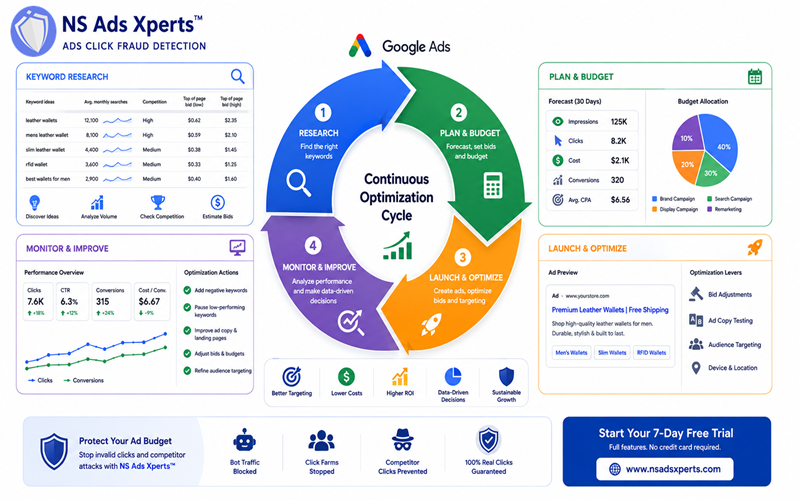
Integrating Keyword Planner Data for Optimal Google Ads Performance
The insights gained from the Google Ads Keyword Planner are only valuable when effectively applied to your campaigns. This final stage involves translating research into action and safeguarding your investment.
Applying Insights to Campaigns
- How to Directly Export Keyword Plans: Once you've curated your ideal keyword list in the Keyword Planner, you can directly export it and integrate it into new or existing Google Ads campaigns. This streamlines the process and ensures your research is accurately reflected in your ad groups.
- Best Practices for Structuring Campaigns and Ad Groups: Based on your Keyword Planner data, structure your campaigns logically. Each campaign should have a clear goal, and ad groups within it should be tightly themed around specific sets of keywords. This allows for highly relevant ad copy and landing pages, which are crucial for high Quality Scores and lower costs on your Google Ads website.
- Emphasize Continuous Monitoring and Adjustment: Keyword research isn't a one-time task. Market trends change, new competitors emerge, and user behavior evolves. Continuously monitor your live campaign performance, adjust your keywords based on what's working (and what's not), and revisit the Keyword Planner regularly to discover new opportunities or refine existing strategies. This iterative process is key to truly optimize Google Ads performance.
Protecting Your Ad Spend & Maximizing ROI with NS Ads Xperts™
Even with the most meticulously planned keywords from the Google Ads Keyword Planner, your campaigns remain vulnerable. A significant problem that plagues advertisers is invalid traffic google ads and click fraud detection. Fraudulent clicks, whether from bots, click farms, or malicious competitors, can quickly deplete your ad budget, skew your data, and drastically reduce your ROI.
This is precisely where NS Ads Xperts™ steps in as the essential ads fraud protection tool that complements your keyword planning efforts. NS Ads Xperts™ ensures that every click you pay for is a genuine, human click, helping you to "Optimize ad costs and increase ROI for online campaigns by preventing click fraud."
NS Ads Xperts™ directly addresses critical pain points faced by businesses running Google Ads: It combats high CPC by eliminating wasted clicks, helps resolve low conversion rates by ensuring traffic quality, stops destructive competitor click fraud, and provides a powerful ad budget waste solution, enabling profitable scaling.
Key features of NS Ads Xperts™ include advanced bot traffic detection, the ability to stop invalid clicks google ads in real-time, and comprehensive click fraud software that monitors and blocks fraudulent IP addresses. With NS Ads Xperts™, you safeguard your budget, improve data accuracy, and truly maximize your ROI optimization.
NS Ads Xperts™ offers flexible pricing to suit various business needs:
- Starter ($39/month): Ideal for small businesses, includes 1 domain and 500 IP blocks/month.
- Business ($69/month): Our most popular plan, offering 3 domains, 1,500 IP blocks/month, and detailed analytics.
- Agency ($159/month): Designed for marketing agencies, providing 20 domains and 10,000 IP blocks/month with advanced analytics and dedicated support.
All plans come with a 7-day free trial, offering full feature access with no credit card required, so you can experience the benefits firsthand.
Call to Action: Ready to ensure your meticulously planned Google Ads budget isn't wasted on fraudulent clicks? Protect your campaigns and maximize ROI with NS Ads Xperts™. Start your 7-day free trial today – no credit card required! Visit us at https://www.nsadsxperts.com/.
FAQ
Here are some frequently asked questions about the Google Ads Keyword Planner:
Q: How do I access Google Ads Keyword Planner?
A: You access it through your Google Ads account. Log in, then navigate to 'Tools and Settings' (wrench icon) and select 'Keyword Planner' under 'Planning'.
Q: Is Google Ads Keyword Planner free to use?
A: Yes, it is free to use. While you need a Google Ads account, you don't need an active campaign or spend money to access and utilize the Keyword Planner's core features.
Q: How do I find keywords for my Google Ads campaign?
A: Use the 'Discover new keywords' feature in Keyword Planner. Enter seed keywords, a website, or a product category to get a list of relevant keyword ideas, along with search volume and competition data.
Q: What is the difference between Google Ads and Google AdSense?
A: Google Ads is for advertisers to run campaigns on Google's network. Google AdSense is for publishers to monetize their websites by displaying Google Ads.
Q: How accurate is Google Ads Keyword Planner data?
A: The data is generally reliable, providing estimations for search volume and competition. However, actual campaign performance can vary due to many factors. It's best used as a guide for planning, not a precise prediction.
Q: Can I use Keyword Planner for SEO keyword research?
A: Absolutely. Keyword Planner is a powerful tool for SEO, helping you identify relevant keywords for content creation, understand search intent, and analyze search volume for organic rankings.
Q: How do I use Keyword Planner to estimate bids and budget?
A: After discovering keywords, move them to your plan. The 'Forecast' section will then provide estimated clicks, impressions, cost, and conversions for different bid amounts and budget settings, helping you plan your ad spend.
Q: What are the best strategies for using Google Ads Keyword Planner effectively?
A: Best strategies include thorough seed keyword research, using negative keywords, analyzing competition, leveraging forecast data for budgeting, and continually refining your keyword lists based on campaign performance and market changes. Consider using tools like NS Ads Xperts™ to protect your ad budget from fraud.
Conclusion
The Google Ads Keyword Planner is more than just a tool; it's the strategic backbone for any successful digital advertising or SEO endeavor. From uncovering valuable keyword ideas and analyzing search volume to estimating bids and forecasting campaign performance, mastering this free resource empowers you to make data-driven decisions that can significantly boost your online visibility and ROI. By diligently applying the steps and strategies outlined in this ultimate guide, you can confidently build targeted, effective Google Ads campaigns and optimize your organic content strategy.
However, even the most perfectly planned campaign can fall victim to fraudulent clicks, wasting valuable budget and skewing performance data. To truly maximize your investment and safeguard your campaigns against invalid traffic, integrating a robust click fraud detection solution is paramount. Don't let your meticulous keyword research go to waste. Protect your ad spend and ensure every click counts with NS Ads Xperts™. Start your free trial today and take the definitive step towards optimized ad performance and unparalleled ROI. Visit https://www.nsadsxperts.com/ to learn more.