Are you a website owner, blogger, or content creator looking to transform your online presence into a revenue stream? If so, you've likely heard of Google AdSense. This powerful platform offers a straightforward way for publishers like you to monetize your digital content by displaying relevant advertisements. Understanding how Google AdSense works, how to get approved, and the best strategies for optimization is crucial for maximizing your earnings.
This comprehensive guide will walk you through everything you need to know about Google AdSense, from its fundamental operations to advanced tips for increasing your revenue. We'll clarify the key differences between Google AdSense and Google Ads, provide a step-by-step application process, share best practices for maximizing your earnings, and ensure you understand Google's essential policies. By the end, you'll be equipped to effectively monetize your website and turn your passion into profit.
What is Google AdSense and How Does It Work?
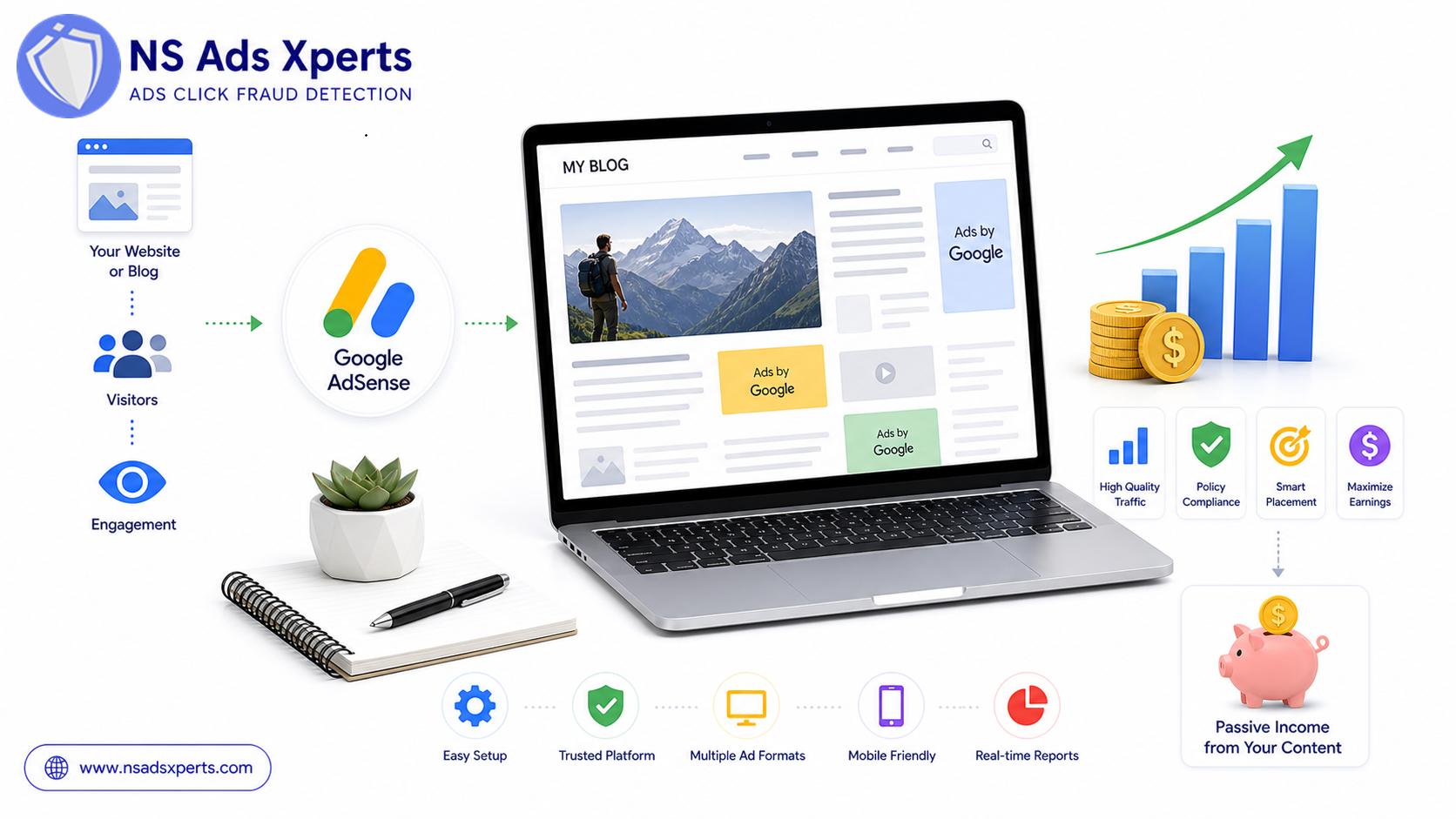
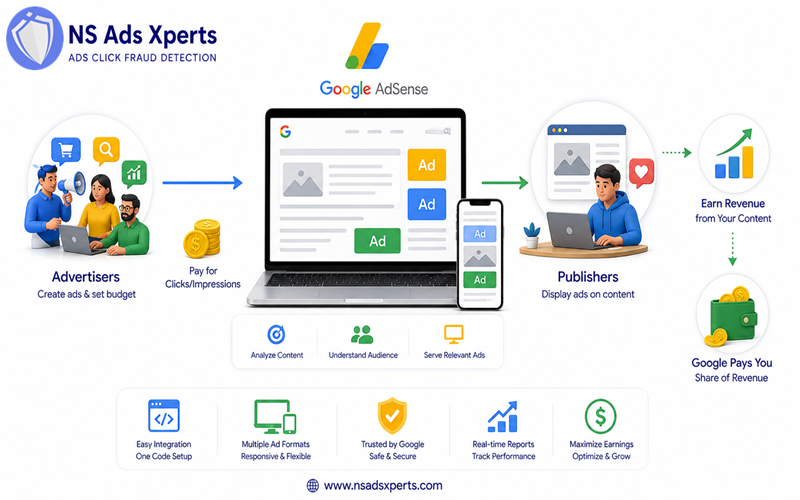
Google AdSense is a popular advertising program run by Google that allows publishers in the Google Network of content sites to serve automatic text, image, video, or interactive media advertisements that are targeted to site content and audience. It's essentially a bridge connecting advertisers with available ad space on websites, blogs, and even YouTube videos.
The core mechanism is remarkably simple yet highly effective. When you sign up for Google AdSense and get approved, you place a small snippet of code on your website. Google then automatically identifies the content of your pages and the demographics of your visitors. Using this information, it serves highly relevant ads from its vast network of advertisers. Advertisers pay Google for these ad placements (typically on a cost-per-click or cost-per-impression basis), and in turn, Google pays a share of that revenue to you, the publisher.
The ease of use is one of AdSense's biggest appeals. You don't need to find advertisers or negotiate rates; Google handles all the heavy lifting, including ad placement, optimization, and payment processing. This allows you to focus solely on creating high-quality content. AdSense supports various ad types, including responsive display ads, in-feed ads that blend seamlessly with your content, in-article ads for better readability, matched content recommendations, and even search ads for sites with internal search functionality.
Google AdSense vs. Google Ads: Understanding the Key Differences
One of the most common points of confusion for newcomers is distinguishing between Google AdSense and Google Ads. While both are integral parts of Google's advertising ecosystem, they serve entirely different audiences and purposes. Understanding this distinction is fundamental for anyone engaging with Google's ad platforms.
Google AdSense is designed for publishers – individuals or businesses that own websites, blogs, or YouTube channels and want to earn money by displaying ads. Publishers provide the ad space on their digital properties, and Google fills that space with relevant advertisements. Essentially, publishers are earning revenue from the ads displayed to their audience.
On the other hand, Google Ads (formerly known as AdWords Google Ads) is Google's primary platform for advertisers. This is where businesses and individuals spend money to create and display their advertisements across Google's vast network, which includes Google Search results, YouTube, Gmail, and millions of websites that participate in Google AdSense. Advertisers use Google Ads to bid on keywords and target specific audiences to reach potential customers. Phrases like 'google ads for business' or 'google ads com' typically refer to this advertiser-centric platform, where a google ads expert or a google ads agency would manage campaigns for clients.
So, in simple terms: Google AdSense is how publishers make money, and Google Ads is how advertisers spend money. They are two sides of the same coin, working together to create a dynamic advertising marketplace. If you're running campaigns on the Google Ads platform, optimizing your ad spend and ensuring your budget isn't wasted on fraudulent clicks is paramount. This is where NS Ads Xpert Global comes in. NS Ads Xpert Global (https://www.nsadsxperts.com/) offers a cutting-edge solution for advertisers using Google Ads. They help businesses optimize their ad spend and significantly increase ROI by preventing click fraud, a major concern for those investing in the Google Ads platform. This highlights the complementary nature of the advertising ecosystem, where publishers earn via AdSense, and advertisers protect their investments with tools like NS Ads Xpert Global.
Step-by-Step Guide to Getting Started with Google AdSense
Embarking on your monetization journey with Google AdSense requires a few essential steps, beginning with ensuring your website meets Google's stringent eligibility requirements. Following this guide will help you navigate the application process smoothly.
AdSense Eligibility Requirements
Before you even consider applying, your website must meet certain criteria to be approved for Google AdSense. Google prioritizes user experience and content quality. Key requirements include:
- Original and Valuable Content: Your site must have unique, high-quality content that provides value to users. Thin content, scraped content, or content solely designed for ads will be rejected.
- Sufficient Traffic: While there's no official minimum traffic requirement, sites with very low traffic might struggle with approval as Google wants to ensure a reasonable audience for advertisers.
- Good Site Design and User Experience: Your website should be easy to navigate, mobile-friendly, and free of broken links.
- Compliance with Google's Policies: Your site must adhere to all AdSense Program policies, including content guidelines (no illegal, adult, or hateful content) and Webmaster Guidelines.
- Age Requirement: You must be at least 18 years old to apply for an AdSense account.
Applying for AdSense: The Process
Once you're confident your website meets the eligibility criteria, you can proceed with the application:
- Create a Google Account: If you don't already have one, you'll need a Google account.
- Visit the AdSense Website: Go to google.com/adsense and click "Get started."
- Enter Your Website URL: Provide the URL of the website you want to monetize.
- Connect Your Site to AdSense: You'll be given a snippet of code to paste into the
<head>section of your website. This allows Google to verify ownership and review your site. - Submit Your Application: After placing the code, Google will review your site. This process can take a few days to several weeks.
Common Reasons for Rejection & Solutions
Many new publishers experience initial rejection. Don't be discouraged; it's often an opportunity to improve your site. Common reasons for AdSense application rejection include:
- Insufficient Content: Your site lacks enough high-quality, original text content. Solution: Add more detailed articles, blog posts, and informational pages.
- Poor Site Navigation: Users can't easily find their way around your site. Solution: Ensure clear menus, internal links, and a logical site structure.
- Low Traffic: Your site doesn't receive enough visitors. Solution: Focus on SEO, social media promotion, and content marketing to drive organic traffic.
- Policy Violations: Your content or site structure violates AdSense program policies. Solution: Review all policies carefully and rectify any issues, especially regarding prohibited content or user experience.
- Broken Links or Functionality: Your site has errors that hinder user experience. Solution: Conduct a thorough audit to fix broken links, images, or unresponsive elements.
Addressing these issues and reapplying can often lead to successful approval. The key is to demonstrate a commitment to providing a valuable and user-friendly experience.
Maximizing Your Google AdSense Earnings: Best Practices
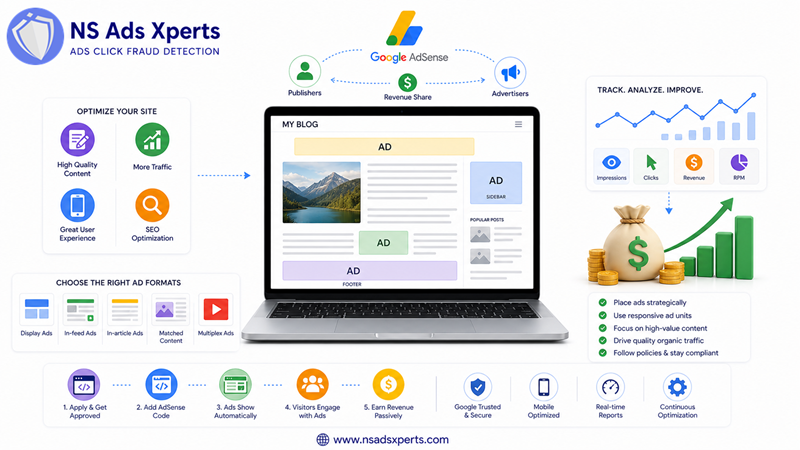
Getting approved for Google AdSense is just the first step. To truly unlock your website's monetization potential, you need to strategically optimize your ad setup and content. Here are actionable strategies to increase your Google AdSense earnings.
Strategic Ad Placement
Where you place your ads significantly impacts their performance. The goal is to make ads visible without being intrusive or violating policies:
- Above the Fold: Place at least one ad unit where it's visible without scrolling, but ensure it doesn't push down primary content.
- Near Content: Ads placed close to engaging content tend to perform better as users are already focused. Consider in-article ads that blend naturally.
- Sidebars and Footers: These are traditional spots that can still be effective, especially for larger display units.
- Mobile Optimization: Ensure your ad units are responsive and display correctly on all devices. Auto ads can help with this by automatically placing ads where they perform best on various screen sizes.
Choosing Effective Ad Formats
Google AdSense offers several ad formats, and selecting the right ones for your content can boost revenue:
- Display Ads: These are the most common, available in various sizes. Responsive display ads automatically adjust to fit available space, making them ideal for diverse layouts and devices.
- In-feed Ads: Designed to fit within your feed (e.g., a list of articles), they offer a native look and feel, improving user experience and click-through rates.
- In-article Ads: Placed within your articles, these ads are optimized for text-heavy pages and can generate higher engagement.
- Matched Content: While not direct ads, these recommend your own content to users, increasing page views and potentially ad impressions on those new pages.
Experiment with different formats and sizes. AdSense provides reports that can help you identify which ad units perform best on your google ads website.
Content Optimization for Higher Earnings
Ultimately, your earnings are tied to the quality and relevance of your content. High-quality, engaging content naturally attracts more visitors and, consequently, more valuable ads:
- Create High-Quality, Relevant Content: Focus on topics that have commercial intent or are related to well-paying niches. This attracts advertisers willing to pay higher CPCs (Cost Per Click).
- Keyword Relevance: While not keyword stuffing, naturally incorporating relevant keywords (which you might discover using tools like Google Ads Keyword Planner) in your content helps Google serve more targeted and higher-value ads.
- User Engagement: Content that keeps users on your page longer, encourages scrolling, and generates interaction can lead to more ad views and clicks.
- Traffic Generation: More legitimate traffic means more ad impressions and potential clicks. Invest in SEO, social media marketing, and other legitimate traffic generation strategies to drive a consistent stream of visitors to your site. Remember, quality traffic is key; avoid any tactics that could generate invalid clicks.
Understanding Google AdSense Policies and Avoiding Violations
Adhering to Google AdSense program policies is non-negotiable for maintaining a healthy and profitable account. Violations can lead to severe consequences, including ad serving limits, account suspension, or even termination. Understanding these policies is crucial for every publisher.
Key AdSense Program Policies
Google's policies cover a wide range of areas to ensure a fair and safe advertising ecosystem for advertisers, publishers, and users. Key areas include:
- Invalid Clicks and Impressions: This is perhaps the most critical policy. Any artificial generation of clicks or impressions (e.g., self-clicking, encouraging clicks, bot traffic) is strictly prohibited.
- Content Policies: Certain content types are forbidden, including adult content, illegal content, hateful content, content that endangers children, or content promoting illegal activities.
- Traffic Sources: Publishers must only use legitimate methods to drive traffic to their sites. Traffic from certain sources, like unsolicited emails or deceptive software, is not allowed.
- Ad Placement Policies: Ads must not be misleading, too close to interactive elements, or placed on pages that primarily feature ads. They should not interfere with user experience.
- Copyright: Your site must respect copyright laws and intellectual property rights.
What is Invalid Traffic and How to Prevent It?
Invalid traffic google ads refers to any activity that doesn't come from a genuine user with real interest. For AdSense, this primarily means artificial clicks or impressions that inflate a publisher's earnings. This can originate from various sources:
- Self-clicking: Publishers clicking their own ads.
- Click farms: Groups of people paid to click ads.
- Automated bots: Malicious software designed to generate clicks and impressions.
- Competitor click fraud: When rivals intentionally click your ads to deplete your budget.
To prevent invalid traffic and protect your Google AdSense account, always focus on generating organic, legitimate traffic through ethical SEO practices, valuable content, and genuine social media engagement. Never incentivize clicks or use deceptive tactics. While AdSense has its own fraud detection systems, publishers should remain vigilant about their traffic sources. If you're an advertiser running campaigns on Google Ads, combating invalid traffic is even more critical for your budget. Tools designed for bot traffic detection and click fraud prevention, like NS Ads Xpert Global, are indispensable for advertisers to protect their investment from competitor click fraud and other forms of invalid clicks that waste ad budget.
Consequences of Policy Violations
Google takes policy violations very seriously. The consequences can range from:
- Ad Serving Limits: Google may temporarily limit the number of ads shown on your site.
- Account Suspension: Your AdSense account might be suspended, typically for 30 days, giving you time to rectify the issues.
- Account Termination: For severe or repeated violations, your AdSense account can be permanently terminated, and you may be banned from using AdSense again.
Regularly review the AdSense Program policies and monitor your account for any warnings or notifications from Google. Promptly addressing any issues is key to maintaining a healthy AdSense account.
Managing Your AdSense Account: Reporting, Payments, and Troubleshooting
Once your Google AdSense account is up and running, effective management is essential for understanding your performance, receiving payments, and resolving any issues that may arise. Navigating your my google adsense dashboard effectively will empower you to make informed decisions.
Navigating the AdSense Dashboard & Reports
The AdSense dashboard is your central hub for all account activity. Here, you can monitor your earnings, review performance data, and manage your ad units:
- Performance Reports: These reports provide crucial insights into your ad performance. Key metrics include:
- Estimated earnings: Your total earnings for a selected period.
- Page views: The number of times a page with ads was viewed.
- Impressions: The number of times an individual ad was displayed.
- Clicks: The number of times users clicked on your ads.
- CTR (Click-Through Rate): The percentage of ad impressions that resulted in a click.
- CPC (Cost Per Click): The average amount you earn for each click.
- RPM (Revenue Per Mille/Thousand impressions): Your estimated earnings per 1,000 page views or impressions.
- Custom Reports: You can create custom reports to analyze specific ad units, pages, countries, or timeframes, helping you pinpoint areas for optimization.
- Site Health: The dashboard also provides notifications regarding policy violations or other account-related issues.
Integrating your AdSense data with Google Analytics can provide even deeper insights into user behavior and how it correlates with your ad performance, helping you refine your content and ad strategies.
Understanding AdSense Payments
Getting paid is the ultimate goal of Google AdSense. Google has a clear payment process:
- Payment Threshold: AdSense typically pays monthly once your earnings reach the payment threshold, which is usually $100 USD (or its equivalent in your local currency).
- Payment Cycle: Earnings are finalized by the 3rd of the following month. Payments are then processed and issued around the 21st of the month.
- Payment Methods: The most common payment method is Electronic Funds Transfer (EFT) directly to your bank account, offering a secure and efficient way to receive your earnings. You'll need to verify your bank account details.
- PIN Verification: Before your first payment, Google will mail you a Personal Identification Number (PIN) to the address associated with your account. You must enter this PIN into your AdSense account to verify your address and enable payments.
Common AdSense Issues & Solutions
Even with careful management, you might encounter issues. Here are some common problems and their solutions:
- Ads Not Showing:
- Solution: Check your AdSense account for policy violations or ad serving limits. Ensure your ad code is correctly implemented and your site is verified.
- Low Earnings:
- Solution: Revisit your content strategy, optimize ad placement, improve traffic quality, and experiment with different ad formats. Lower CPCs might be due to your niche or audience.
- Payment Delays:
- Solution: Ensure you've reached the payment threshold, verified your address with a PIN, and provided correct bank details. Check your payment history in the my google adsense dashboard.
- Account Suspension/Termination:
- Solution: Immediately address the policy violation mentioned in Google's notification. Rectify the issue and appeal if you believe it was an error.
The AdSense Help Center is an invaluable resource for troubleshooting specific problems and understanding detailed policies. Staying proactive and informed will help you maintain a successful Google AdSense account.
Frequently Asked Questions About Google AdSense
Here are some common questions publishers have about Google AdSense:
Q: What is the main difference between Google AdSense and Google Ads?
A: Google AdSense is for publishers to earn money by displaying ads on their websites, while Google Ads (formerly AdWords) is for advertisers to spend money to display their ads across Google's network.
Q: How do I apply for Google AdSense and get approved?
A: You apply through the Google AdSense website, ensuring your site meets eligibility requirements like original content, sufficient traffic, and policy compliance. Google reviews your application, which can take a few days to weeks.
Q: How can I increase my Google AdSense earnings?
A: Increase earnings by creating high-quality, engaging content, optimizing ad placement and formats, driving more legitimate traffic to your site, and adhering to AdSense policies.
Q: What are the eligibility requirements for Google AdSense?
A: Requirements include unique and valuable content, sufficient traffic, a well-designed site, compliance with Google's policies, and being at least 18 years old.
Q: Why was my Google AdSense application rejected?
A: Common reasons for rejection include insufficient content, low traffic, poor site navigation, or violations of AdSense program policies. Address these issues and reapply.
Q: How does Google AdSense pay, and what is the payment threshold?
A: AdSense pays monthly via electronic funds transfer (EFT) once your earnings reach the payment threshold, which is typically $100 USD (or equivalent in local currency).
Conclusion
Google AdSense offers an incredible opportunity for website owners, bloggers, and content creators worldwide to monetize their digital content and earn a passive income. By understanding how the program works, diligently meeting its eligibility requirements, strategically placing ads, and consistently creating high-quality content, you can significantly boost your earnings. Remember to always prioritize user experience and strictly adhere to Google's program policies to ensure the long-term health and success of your account.
While Google AdSense empowers publishers, it's equally important for advertisers to protect their investment on platforms like Google Ads. If you are an advertiser managing google ads for business, you understand the constant battle against wasted ad spend due to invalid clicks. NS Ads Xpert Global provides a robust solution to optimize your advertising costs and increase ROI by preventing click fraud. Our NS Ads Xperts™ software is a leading SaaS solution for click fraud detection, stopping bot traffic, click farms, and competitor click fraud in real-time across Google Ads, Facebook Ads, and TikTok Ads.
Don't let high CPCs or low conversion rates plague your campaigns. NS Ads Xpert Global helps businesses, marketing agencies, e-commerce stores, and SaaS companies ensure every ad dollar counts. Experience the difference with a 7-day free trial – no credit card required, full features included! Visit https://www.nsadsxperts.com/ today to protect your ad budget and maximize your ROI. For expert assistance, reach out to NS Ads Xpert Global at +1800-123-4567 or find us at 123 Global Street, Suite 400, World City, GA 30303. Let us help you achieve unparalleled advertising efficiency.