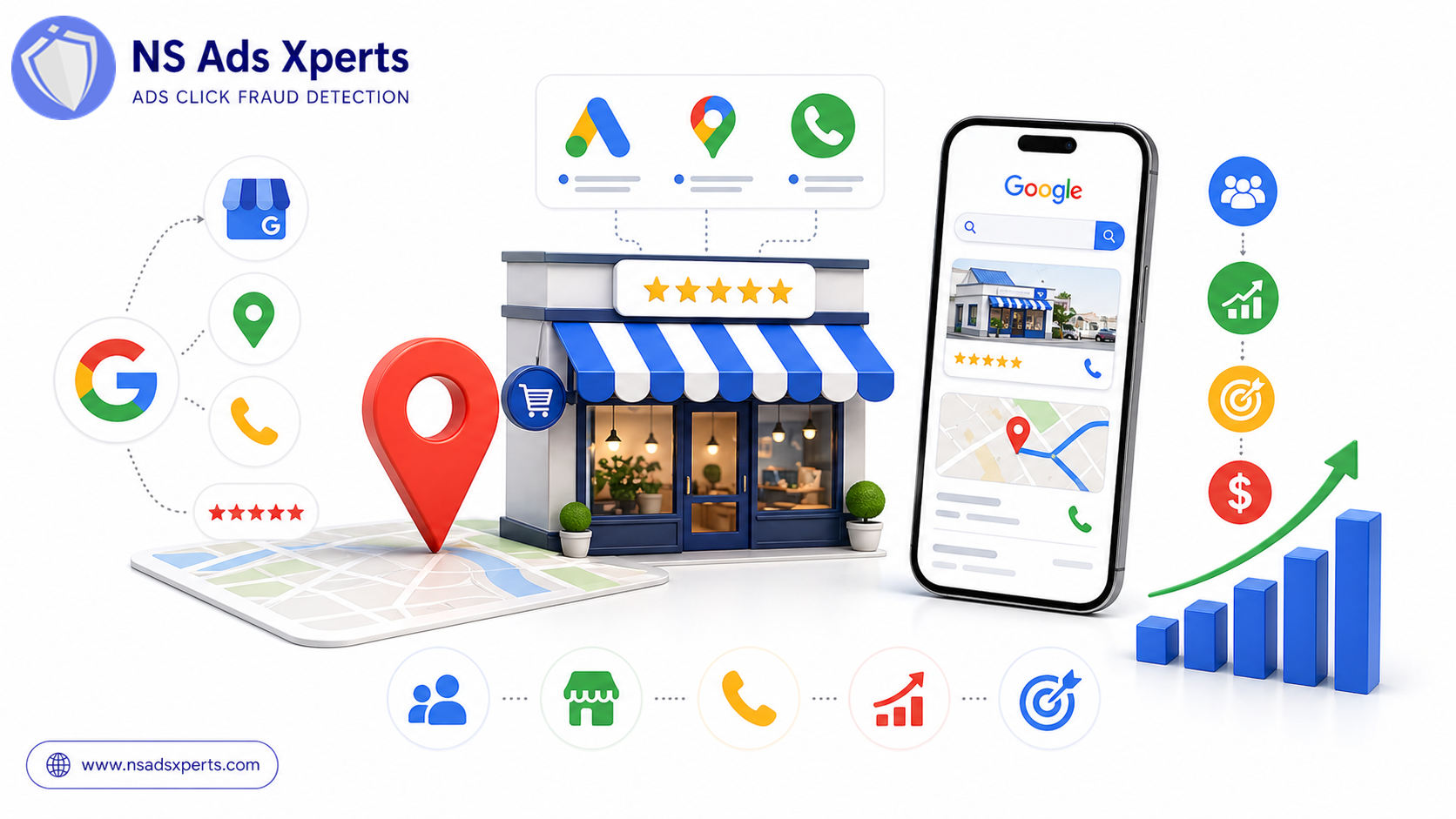
In today's competitive digital landscape, local businesses face the constant challenge of standing out and attracting customers right in their backyard. The good news? Google offers powerful tools specifically designed to help you connect with your local audience. If you've ever searched for a service or product "near me," you've likely encountered the impact of Google Local Ads – a game-changer for businesses aiming to dominate their local market.
This comprehensive guide will demystify the world of Google's local advertising solutions. Whether you're a local business owner, a marketing manager, or a digital marketing professional, we’ll walk you through everything you need to know. From understanding the different types of Google Local Ads to setting up effective campaigns and optimizing them for maximum return on investment (ROI) and lead quality, we've got you covered. Get ready to transform your local search visibility and drive more qualified leads to your doorstep.
What Are Google Local Ads? A Comprehensive Overview
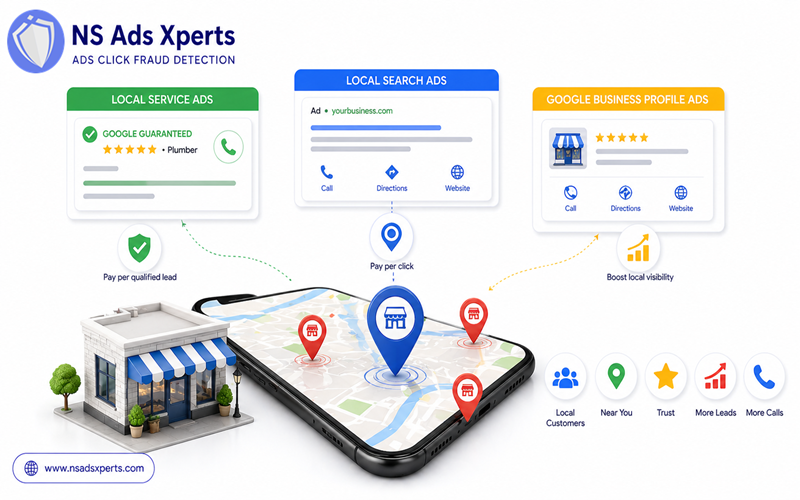
At its core, "Google Local Ads" serves as an umbrella term for various advertising solutions specifically designed to target customers within a defined geographic area. These ads are crucial for businesses that rely on local foot traffic, service calls, or in-person interactions. They help you appear prominently when potential customers are searching for products or services you offer in their vicinity.
There are several key types of Google Local Ads, each with unique characteristics and benefits:
- Google Local Service Ads (LSAs): These are perhaps the most distinctive type of Google Local Ads. Appearing at the very top of Google Search results, often above traditional paid ads and organic listings, LSAs are designed for specific service-based businesses like plumbers, electricians, locksmiths, and HVAC technicians. A key feature is the "Google Guaranteed" badge, which builds immediate trust with potential customers. Businesses pay per qualified lead, not per click, making them a highly efficient way to get new customers.
- Google Local Search Ads: These ads appear within standard Google Search results and are also prominently displayed on Google Maps. They are an extension of traditional Google Ads campaigns but are specifically geo-targeted and often linked directly to your Google Business Profile listing. Unlike LSAs, these operate on a pay-per-click (PPC) model, where you pay each time someone clicks on your ad. They can include location extensions, call buttons, and links to your website or directions.
- Google Business Profile (GBP) Ads: While your Google Business Profile itself is a free listing, you can leverage it with paid promotions to enhance its visibility. These paid enhancements are often intertwined with Google Local Search Ads, allowing your business to show up higher and more frequently in Google Maps and local search results. Think of it as amplifying your existing, free local presence with targeted advertising spend.
The main difference between these and traditional Google Ads is their explicit focus on local intent and geographic targeting. Traditional Google Ads might target broader keywords, but Google Local Ads are all about connecting you with customers who are explicitly looking for a local solution, often using terms like "near me" or specifying a city name. Effectively utilizing these options means your business gets a significant boost where it matters most: in your local community.
Why Google Local Ads Matter: Benefits for Local Businesses
In today's digital-first world, a strong online presence is non-negotiable for any business, but it's especially critical for local enterprises. Customers are increasingly turning to their smartphones and computers to find nearby services and products. This is where Google Local Ads become an indispensable tool, offering a multitude of benefits that directly address the needs and pain points of local businesses.
Here are the primary advantages of integrating Google Local Ads into your marketing strategy:
- Increased Local Visibility: The most immediate benefit is enhanced visibility. Your ads appear prominently when customers are actively searching for what you offer in your specific service area, ensuring your business is seen by those who matter most.
- Qualified Local Leads: Unlike broad advertising, Google Local Ads attract users with high purchase intent. These are people who need your service or product now and are looking for a local provider. This translates into significantly better conversion rates and more genuine google local leads for your business.
- Build Trust and Credibility: Features like the "Google Guaranteed" badge on Google Local Service Ads instill immediate confidence in potential customers. Appearing high in search results, often above organic listings, also lends an air of authority and reliability to your brand.
- Cost-Effective Marketing: By targeting specific geographic areas, you can optimize your ad spend, ensuring your budget is allocated to reach only relevant potential customers. This precision helps reduce wasted ad spend and improves your overall marketing efficiency.
- Competitive Advantage: Many local businesses are still relying on traditional marketing or basic online listings. By actively running Google Local Ads, you gain a significant edge over competitors, standing out in crowded local search results and capturing market share.
Local businesses often grapple with challenges like high Cost Per Click (CPC) and low conversion rates if their campaigns aren't precisely targeted. Google Local Ads directly address these pain points by focusing on intent-driven, geographically relevant searches, leading to more efficient spending and a stronger return on your marketing investment.
Setting Up Your Google Local Ads Campaign: A Step-by-Step Guide
Launching a successful Google Local Ads campaign requires careful planning and execution. This section provides a practical, actionable guide to help you get started, whether you're aiming for Google Local Service Ads or leveraging your Google Business Profile for local search visibility.
Prerequisites: Optimizing Your Google Business Profile
Before you even think about running paid ads, a robust and optimized Google Business Profile (GBP) is fundamental. It's the foundation for any local search presence.
- Ensure your Google Business Profile is complete and up-to-date: Fill out every section – business name, address, phone number, website, hours of operation, and a detailed description of your services/products.
- Verify business address, phone number, hours, services/products: Accuracy is paramount. Incorrect information can deter customers and harm your local SEO.
- Encourage and respond to customer reviews: Reviews are a powerful trust signal. Actively ask satisfied customers for reviews and respond professionally to all feedback, positive or negative.
- Add high-quality photos: Showcase your business, products, and team with appealing images.
For Google Local Service Ads (LSAs):
Setting up Google Local Service Ads is a distinct process:
- Eligibility requirements and verification process: Not all businesses qualify. You'll need to meet specific criteria for your industry and undergo background checks for your business and employees, as well as provide proof of insurance. This process ensures the "Google Guaranteed" badge holds its value.
- Creating your LSA profile and service areas: Once approved, you’ll create a detailed profile outlining your services and the specific geographic areas you serve. This is crucial for targeting your google local campaigns effectively.
- Setting your budget and bidding strategy: LSAs operate on a pay-per-lead model. You set a weekly budget, and Google automatically adjusts your spending to get you the most leads within that budget.
- Managing leads and communication: Leads come directly to your LSA inbox or app. You can listen to calls, mark leads as booked or dismissed, and communicate with potential customers directly through the platform.
For Google Local Search Ads & Google Business Profile Integration:
These campaigns are managed through the standard Google Ads platform, but with a strong local focus:
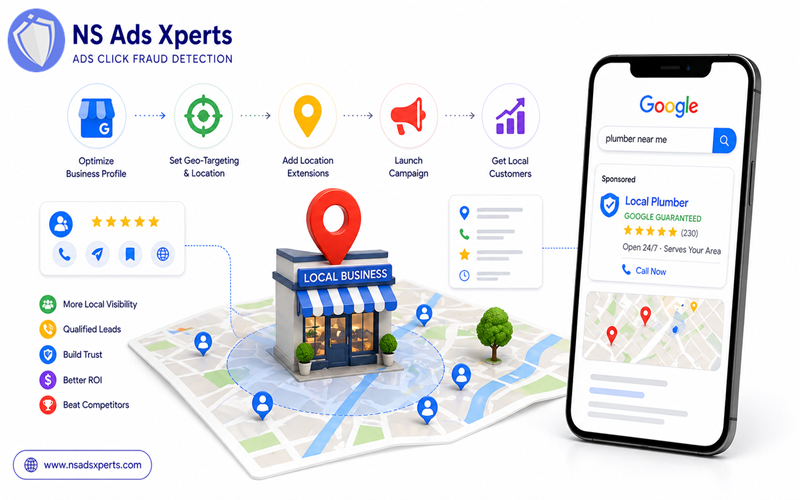
- Linking your GBP to your Google Ads account: This is a critical step. It allows your ads to pull information from your GBP, such as location extensions, phone numbers, and reviews, making your ads more relevant to local searches.
- Structuring campaigns:
- Geo-targeting: Precisely define the cities, postal codes, or radius around your business where your ads will appear. This is how you create effective google local campaigns.
- Bid adjustments for local: You can set higher bids for users located very close to your business, recognizing their higher intent.
- Location extensions: Ensure these are enabled in your Google Ads account to display your business address, phone number, and a map marker directly in your ad.
- Keyword research for local intent: Focus on keywords people use when looking for local services. Examples include "plumber near me," "best coffee shop [city name]," "auto repair [neighborhood]," or "emergency dentist in [county]". Don't forget long-tail variations.
Throughout this setup, the importance of accurate business information and a strong online presence cannot be overstated. A well-maintained Google Business Profile and meticulously configured Google Local Ads are the keys to unlocking local customer engagement. If you need any google ads help during this process, Google's support resources are a good starting point.
Maximizing ROI & Lead Quality: Advanced Google Local Ads Optimization
Setting up your Google Local Ads is just the beginning. To truly succeed and ensure you're getting the most out of your investment, continuous optimization is essential. These advanced strategies will help you refine your campaigns for maximum ROI and lead quality.
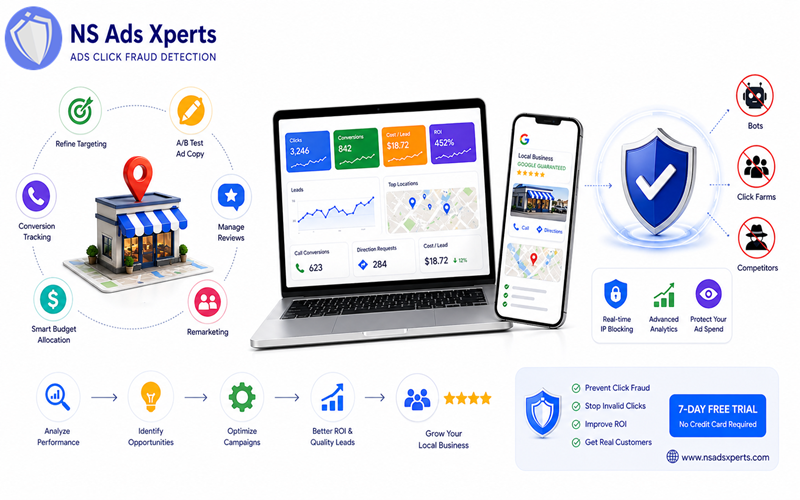
- Refine Targeting: Go beyond basic geo-targeting. Implement hyper-local targeting (e.g., specific neighborhoods or even street radii), layer in audience demographics (age, income, parental status if relevant), and utilize time-of-day scheduling to show ads only when your business is open or when customers are most likely to convert.
- A/B Testing Ad Copy: Don't just set and forget your ad creatives. Experiment with different headlines, descriptions, and calls to action. Highlight unique selling propositions (USPs) specific to your local business, such as "24/7 service in [city]" or "Family-owned since [year]."
- Conversion Tracking: This is non-negotiable for understanding performance. Set up robust conversion tracking for every valuable action: phone calls (especially for LSAs), form fills, direction requests on Maps, and even specific page views like your "request a quote" page. This data is vital for making informed optimization decisions.
- Review Management: For LSAs, your reviews directly impact your ad visibility and trustworthiness. Actively solicit new reviews from satisfied customers and respond promptly and professionally to all feedback across all platforms. Positive reviews enhance your ad's appeal, while thoughtful responses can mitigate negative ones.
- Budget Allocation: Continuously monitor which ad types, locations, and keywords are performing best. Strategically shift your budget to these high-performing areas and pause or re-evaluate underperforming ones. This dynamic approach ensures your ad spend is always working its hardest.
- Google Ads Remarketing: Don't forget about users who have previously interacted with your business online but didn't convert. Implement Google Ads remarketing campaigns to re-engage these warm leads with tailored messages, bringing them back to complete a desired action.
Addressing Ad Fraud for True ROI
One of the most insidious challenges that can severely impact the ROI of your Google Local Ads is ad fraud. Invalid clicks from bots, click farms, or even malicious competitors can rapidly inflate your Cost Per Click (CPC) and drain your ad budget without generating a single legitimate lead. This leads to frustratingly low conversion rates and inaccurate data, making it impossible to gauge the true effectiveness of your local campaigns.
This is where NS Ads Xperts™ comes in as a critical solution for preventing ad fraud in Google Local Ads. As a leading ads fraud protection tool, NS Ads Xperts™ helps local businesses ensure their precious ad spend goes exclusively to legitimate potential customers, thereby dramatically improving actual ROI and the quality of local leads. Our advanced software proactively identifies and blocks various forms of invalid traffic Google Ads, including bot traffic detection and preventing competitor click fraud.
With NS Ads Xperts™, you benefit from real-time IP blocking and detailed analytics, giving you peace of mind that your budget is protected from waste. Say goodbye to high CPC and low conversion rates caused by fake clicks, and hello to optimized ad spend and genuine engagement. We help you prevent click fraud and stop invalid clicks Google Ads, ensuring your marketing budget works harder for your local business.
Ready to safeguard your local ad budget and ensure every click counts? Visit NS Ads Xpert Global's website at https://www.nsadsxperts.com/ for more information on our robust click fraud detection solution. Take control of your ad spend and try NS Ads Xperts™ with a 7-day free trial (no credit card required) to optimize your local ad spend and prevent budget waste today!
Leveraging Analytics for Continuous Improvement
Effective optimization is data-driven. Continuously monitor key metrics like cost per lead, conversion rate, and call duration. Use this data to identify underperforming areas, uncover opportunities for improvement, and make informed decisions to scale your successful local ad efforts.
Pricing, Budgeting, and Measuring Success in Google Local Ads
Understanding the financial aspects and how to measure the effectiveness of your Google Local Ads is crucial for any business owner or marketing manager. A well-managed budget and clear KPIs are the backbone of a successful campaign.
Understanding Costs:
- Pay-per-lead for LSAs versus pay-per-click for Local Search Ads: This is a fundamental distinction. With Google Local Service Ads, you only pay when a qualified lead contacts you (a call, message, or booking request). For Google Local Search Ads, you pay each time someone clicks on your ad, regardless of whether it results in a lead.
- Factors influencing cost: The cost per lead or click can vary significantly based on your industry, the level of competition in your service area, the specific geographic regions you're targeting, and your chosen bid strategy. High-demand services in densely populated areas will generally have higher costs.
Budgeting Strategies:
- How to set a realistic daily/monthly budget: Start with a budget you're comfortable with and can sustain. Research average costs in your industry and location to set realistic expectations. For LSAs, Google provides estimated lead costs. For Local Search Ads, experiment with a daily budget and scale up as you see results.
- Tips for scaling budgets responsibly: As your campaigns perform well and deliver positive ROI, you can gradually increase your budget. Always monitor performance closely when scaling to ensure efficiency is maintained.
Measuring Success (Key Performance Indicators - KPIs):
To truly understand the impact of your Google Local Ads, you need to track the right metrics:
- For LSAs: Key KPIs include the number of leads received, the cost per lead, the booking rate (how many leads convert into actual jobs), and customer reviews.
- For Local Search Ads: Focus on clicks, impressions, click-through rate (CTR), conversion rate, cost per conversion (CPA), and overall ROI. It's essential to track actual conversions (phone calls, form submissions, store visits if applicable) rather than just clicks.
By diligently tracking these metrics, you can gain insights into what's working and what isn't, allowing you to continually optimize your google local campaigns. Remember, tools like NS Ads Xperts™ play a vital role here by filtering out invalid clicks, ensuring your ROI calculations are based on genuine engagement and accurate data, giving you a true picture of your ad spend effectiveness.
Troubleshooting & Getting Help with Google Local Ads
Even with the best setup, challenges can arise when running Google Local Ads. Knowing how to troubleshoot common issues and where to find Google Ads help is essential for sustained success.
Address common challenges faced by local businesses:
- Low lead volume or poor lead quality: This could stem from overly broad targeting, unoptimized ad copy, or issues with your Google Business Profile. For LSAs, it might indicate problems with your review score or profile completion.
- High ad spend with little return: This often points to inefficient targeting, a lack of conversion tracking, or, critically, a significant amount of budget being wasted on invalid clicks and ad fraud.
- Issues with verification for LSAs: The verification process can be stringent. Delays or rejections might be due to incomplete documentation, mismatched information, or specific industry requirements.
- Tracking discrepancies: Sometimes, your Google Ads data might not align with your internal tracking or CRM. This requires a thorough review of your conversion tracking setup.
Provide practical troubleshooting tips:
- Review targeting settings: Ensure your geo-targeting is precise and aligned with your service area.
- Optimize ad copy and landing pages: Make sure your ads are compelling and that the landing page experience is seamless and relevant.
- Check Google Business Profile: Ensure all information is accurate and up-to-date, and actively manage reviews.
- Analyze search terms: For Local Search Ads, regularly review the search terms report to identify irrelevant searches and add them as negative keywords.
- Implement ad fraud protection: If you suspect high ad spend with low returns, investigate potential click fraud.
Suggest resources for 'Google Ads help':
- Google Ads support documentation: Google offers extensive guides and articles on every aspect of Google Ads.
- Google Ads community forums: Engage with other advertisers and google ads specialist professionals to get advice and solutions.
- Considering a 'google ads specialist' or agency: For complex issues or if you lack the time/expertise, hiring a specialized agency or a google ads specialist can provide expert guidance and management.
It's worth reiterating the value of tools like NS Ads Xperts™ for preventing specific problems like budget waste due to ad fraud. By proactively protecting your campaigns from invalid clicks, you address a root cause of high ad spend and low return, ensuring your google local ads budget is used effectively to generate genuine local leads.
Frequently Asked Questions About Google Local Ads
Here are some common questions about Google Local Ads to further clarify their utility and functionality for local businesses.
Q: What are Google Local Service Ads and how do they work?
A: Google Local Service Ads (LSAs) are a specific type of Google Local Ad for service-based businesses. They appear at the top of search results with a 'Google Guaranteed' badge. Businesses pay per qualified lead, not per click, and must undergo a background check and verification process.
Q: How do I set up Google Local Ads for my business?
A: Setup involves optimizing your Google Business Profile, then choosing between Google Local Service Ads (via the LSA portal) or Google Local Search Ads (via Google Ads platform) by setting up geo-targeting, keywords, and ad copy relevant to your local area.
Q: What is the cost of running Google Local Ads?
A: The cost varies. Google Local Service Ads operate on a pay-per-lead model, with costs depending on your industry and location. Google Local Search Ads use a pay-per-click (PPC) model, where costs are influenced by keyword competition, bid strategy, and geographic targeting. You set a daily or monthly budget.
Q: How can Google Local Ads help my small business get more leads?
A: Google Local Ads connect your business directly with customers actively searching for your services or products nearby. By appearing prominently in local search results and maps, they increase your visibility, build trust (especially with 'Google Guaranteed'), and drive highly qualified local leads directly to you.
Q: What's the difference between Google Local Ads and Google Business Profile?
A: Google Business Profile (GBP) is a free listing that helps your business appear in Google Search and Maps. Google Local Ads are paid advertisements that enhance your visibility beyond your organic GBP listing, often linking to or leveraging your GBP data to show up more prominently in local search results.
Q: How do I optimize my Google Local Ads campaign for better results?
A: Optimize by refining geo-targeting, A/B testing ad copy, ensuring robust conversion tracking, actively managing reviews, and strategically allocating your budget. Additionally, using a tool like NS Ads Xperts™ to prevent click fraud is crucial for ensuring your budget is spent on legitimate leads and accurate ROI.
Q: Are Google Local Service Ads worth it for service-based businesses?
A: Yes, for many service-based businesses, LSAs are highly effective. The 'Google Guaranteed' badge builds immediate trust, and the pay-per-lead model means you only pay for genuine inquiries, making them a potentially high-ROI advertising channel.
Q: How do I get Google Local Ads help if I'm having issues?
A: For assistance, you can refer to Google Ads' official support documentation, participate in Google Ads community forums, or contact Google Ads support directly. For specific issues like preventing ad fraud and optimizing budget, consider specialized tools like NS Ads Xperts™.
Conclusion
Google Local Ads offer an unparalleled opportunity for local businesses to connect with high-intent customers exactly when they're searching for your products or services. By understanding the nuances of Google Local Service Ads, Local Search Ads, and how to integrate them with your Google Business Profile, you can significantly boost your local visibility, generate more qualified google local leads, and ultimately drive growth for your business.
Remember, success in local advertising isn't just about setting up a campaign; it's about continuous optimization, smart budgeting, and diligently measuring your ROI. And crucially, it's about protecting your investment from wasted spend. As you embark on or refine your google local campaigns, be mindful of threats like click fraud that can erode your budget and skew your performance data. Tools like NS Ads Xperts™ are designed to safeguard your ad spend, ensuring every dollar works towards genuine customer connections.
Take the leap and start leveraging the power of Google Local Ads today. Optimize your campaigns, protect your budget, and watch your local business thrive. Visit NS Ads Xpert Global at https://www.nsadsxperts.com/ to learn how NS Ads Xperts™ can help you prevent click fraud and maximize the true ROI of your local advertising efforts with a 7-day free trial. Your local customers are searching – make sure they find you.